
[DAS] How to uninstall the agent plug-in under Windows
Problem Description
After installing the agent plug-in on the Windows server, I found that there is no program in the server that can be uninstalled. I don't know how to uninstall it.
Process——
- After the agent plug-in is installed on the Windows server, there is no installation program and you need to manually uninstall it in the installation file.
- In the C drive, go to C:\Program Files\Sangfor\IAG\EPS, click uninstall.bat to uninstall
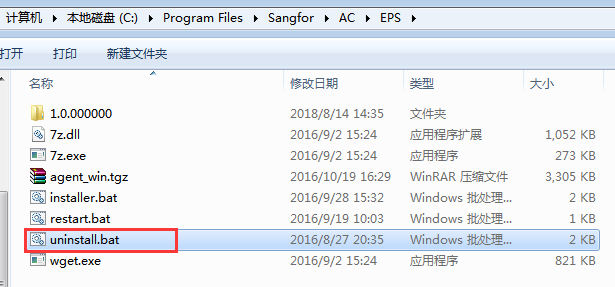
119625bf697acdf56c.png (38.68 KB) - If the uninstallation is successful, delete the Sangfor folder.
solution
In the C:\Program Files\Sangfor\IAG\EPS file, click uninstall.bat to uninstall
Original Link
https://support.sangfor.com.cn/cases/list?product_id=22&type=1&category_id=6622&isOpen=true