
[IAG] 12.0.8 Authentication Policy MAC as Username Automatic Entry User and MAC Address Binding Failed
Problem Description
After IAG was upgraded from 6.1 to 12.0.8, the single sign-on configured in the authentication policy failed to be successful. No authentication was required and the MAC address was used as the user name. At the same time, the user binding MAC address was checked, and it was found that the entry failed
Process——
- There is no problem with the configuration of remote authentication policy configuration entry. New users cannot be automatically entered. The previous binding relationship was entered in version 6.1.
- If you delete the locally entered MAC address username and log in again, you can only enter the username, but not the MAC address binding relationship.
- There is no corresponding conflicting binding relationship between user binding and IP/MAC binding
- Use your own device to configure the test and find that you can directly configure the authentication policy to select "no authentication required" and then check "Enter the binding relationship" to succeed.
Root cause
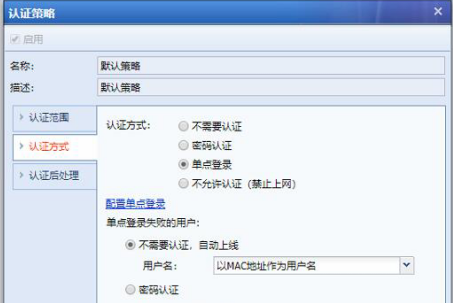
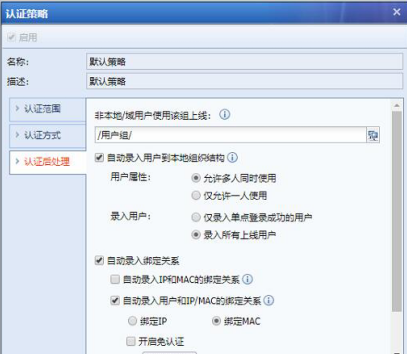
6.1 Single sign-on and no authentication required are together. After upgrading to 12.X, the configuration is converted to the authentication policy that does not require authentication if single sign-on fails. This configuration does not support the binding relationship between the user name and MAC address of users who do not need authentication.
As shown in the figure:
795495b485ccdbc2d8.png (92.06 KB)
910155b485cd96fd59.png (104.01 KB)
solution
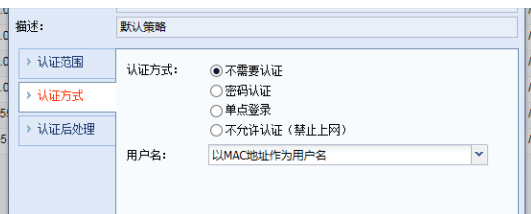
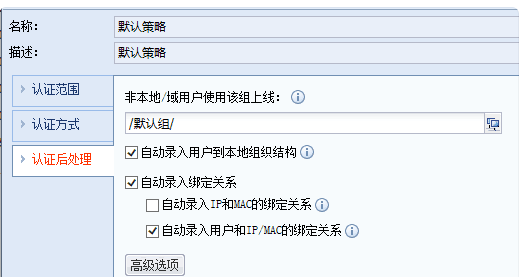
Modify the authentication policy to not require authentication, and then check the option to automatically enter the binding relationship between the user and MAC.
As shown in the figure:
384325b485cf653474.png (32.08 KB)
519435b485d043abf8.png (18.76 KB)
Suggestions and Conclusion
6.1 When upgrading to version 11.X or 12.X or above, the authentication strategy will be slightly different. It is recommended to modify it according to your needs.
Original Link
https://support.sangfor.com.cn/cases/list?product_id=22&type=1&category_id=5997&isOpen=true