
[IAG] 802.1x Ingress Client opens error message
Problem Description
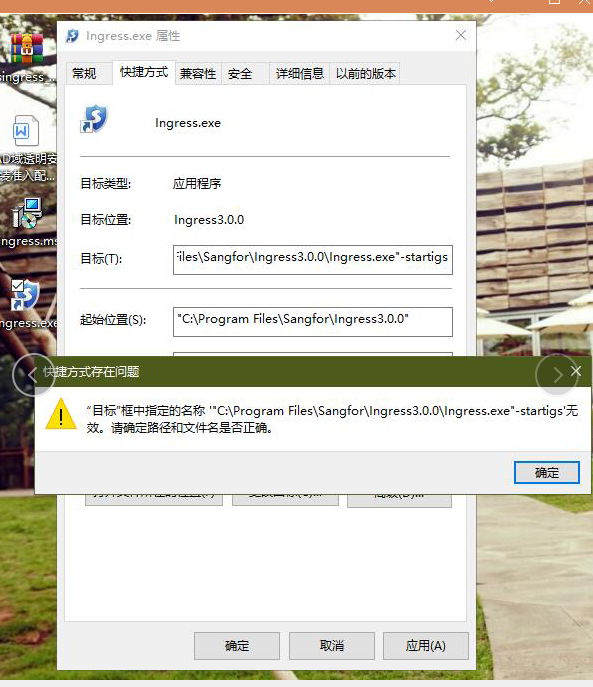
Install the 802.1x access authentication client, create a shortcut, and open it on both machines. The error message is as shown in the figure:
529685e572668bb663.png (430.06 KB)
Process——
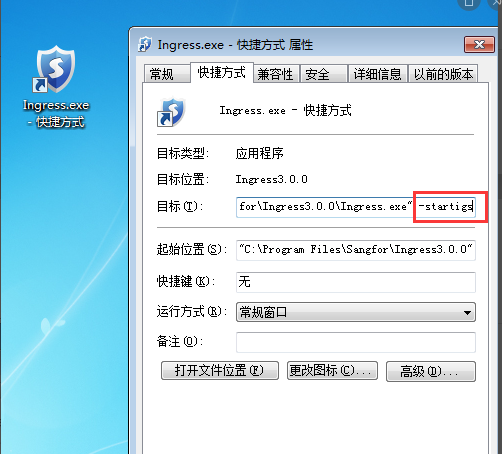
The shortcut parameter is incorrectly filled in, and there is a missing space after the quotation mark. The correct format is as shown in the figure:
382855e5726c89ec0f.png (107.09 KB)
Root cause
The shortcut format is incorrect;
solution
It opens normally after filling in the correct format;
Original Link
https://support.sangfor.com.cn/cases/list?product_id=22&type=1&category_id=7257&isOpen=true