
[IAG] A computer on the intranet cannot access the IAG console – there is a conflict with the computer’s virtual network card address
Problem Description
There is a computer on the intranet that cannot access the IAG console, but can ping the IAG bridge address, but cannot telnet the console port. Other computers are normal
Process——
-
Open the pass-through test on the IAG, but still cannot log in to the IAG
-
Capture data packets for analysis. The computer telnets the IAG's console port, but the data packets do not reach the IAG.
-
Capture the data packets of the computer pinging IAG. The computer shows that it is connected, but no data packets can be captured on IAG.
-
Use the computer tracert to trace the route and find that after one hop, it reaches the IAG bridge address 192.168.199.1
-
Check the computer network port configuration and find that there is a virtual network port with this address
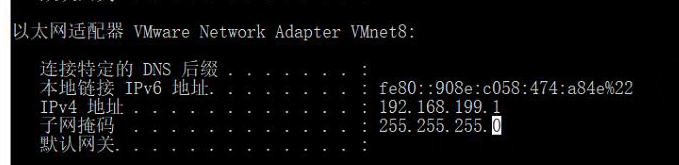
239935d39c4ecdb27f.png (89.91 KB)
Root cause
Address Conflict
solution
Disable the virtual network port solution
Original Link
https://support.sangfor.com.cn/cases/list?product_id=22&type=1&category_id=7007&isOpen=true