
[IAG] A new external network line was added, causing abnormal Internet access on the internal network
Problem Description
The user added a new external network and connected the line, only to find that all the internal network users were disconnected
Process——
- Ask the user to connect to the external network line with a laptop to see if the Internet is normal. If the laptop can access the Internet normally after single connection, it means there is no problem with the line.
- Check the NAT configuration and find that the line only proxies one IP to access the Internet. Other intranet IPs are all proxied by the original line as NAT proxies.
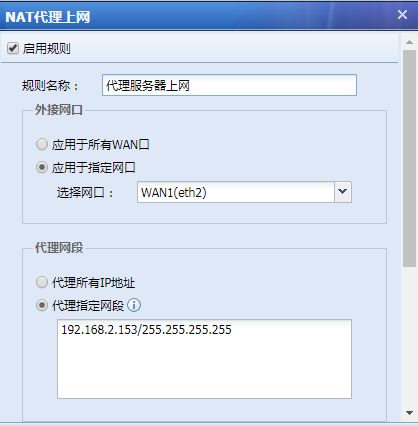
393775cbaaac88edcd.png (30.96 KB) - Check the link load policy and find that the routing policy of the first policy is source IP, destination IP, and service selection is all. This routing policy causes all users to match this policy route. Check the target line configuration again, and choose to use the previous line first. The previous line happens to be the newly added external network line, and the NAT policy of this line only proxies one address of the internal network.
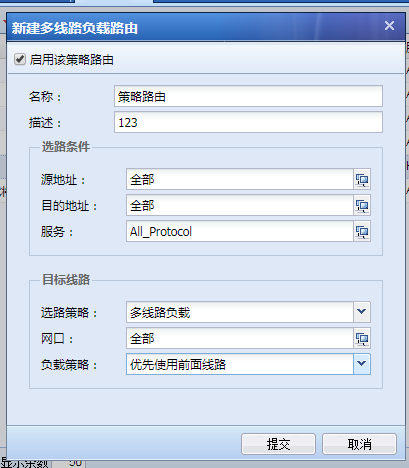
635505cbaacc6976be.png (36.88 KB) - All addresses in the intranet except this IP address are routed along the newly added line according to this policy, but the NAT policy only proxies this IP address, so other users in the intranet cannot access the Internet. Modify the policy routing to let other IP addresses follow the original route
solution
Modify the policy routing to let other IP addresses in the intranet follow the original route.
Original Link
https://support.sangfor.com.cn/cases/list?product_id=22&type=1&category_id=6898&isOpen=true