
[IAG] Access policy is not effective – the user terminal matching the access policy does not pop up the access interception page
Problem Description
The user terminal that matches the access policy does not pop up the access interception page, and the terminal cannot download the access plug-in, but the terminal can still access the Internet
Process——
- Check that online users match the corresponding admission policy configuration.
- The corresponding user terminal address does not have direct global exclusion enabled
- Check the corresponding online user and find that the terminal type is not identified

123.png (47.96 KB)
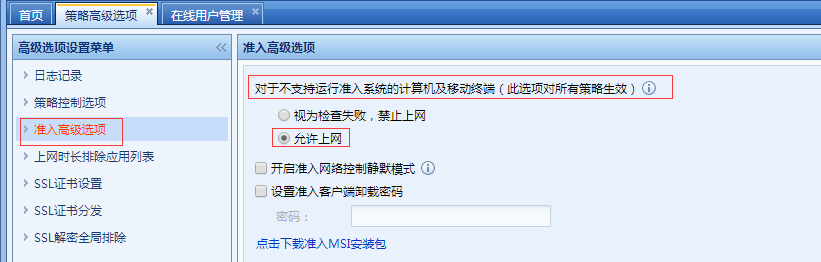
123 - Check the advanced policy options and access advanced options again, and find that "For computers and mobile terminals that do not support the access system", "Allow Internet access" is checked.
321.png (33.11 KB)
321 - After changing the option to "consider it a check failure and prohibit Internet access", the access interception page pops up normally. After downloading the access plug-in, install it on the terminal computer. After successful installation, the computer can access the Internet normally.
Root cause
The device does not detect the terminal type, but the advanced access option allows Internet access by default for terminals that do not support the access system.
solution
In the access advanced options, check "For computers and mobile terminals that do not support the access system, consider it as a check failure and prohibit Internet access"
Original Link
https://support.sangfor.com.cn/cases/list?product_id=22&type=1&category_id=7401&isOpen=true