
[IAG] Access rules have been set, but the client has been prompted for violation, and the policy of prohibiting Internet access has not taken effect – the silent installation function has been enabled
Problem Description
The access rules are set, and the client has prompted the violation, but the policy of prohibiting Internet access is not effective.
Process——
According to the phenomenon, the terminal has violated the rules, which means that the access policy is enabled.
- Check that data pass-through is not enabled.
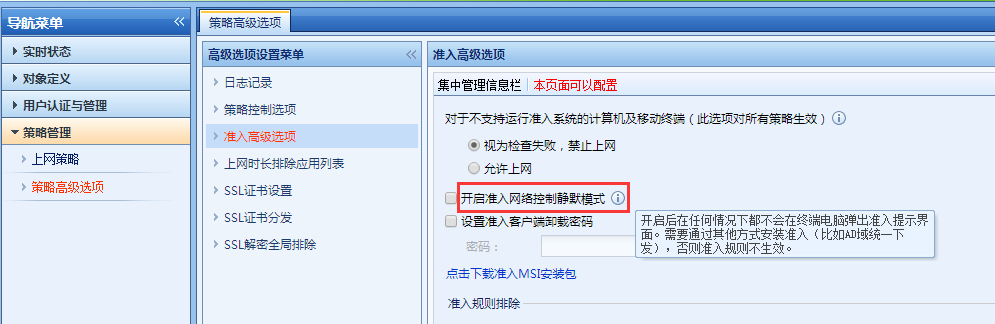
- The interface is found to have enabled [Enable silent mode for network access control] to send silent installation packages through the AD domain
Root cause
[Enable silent mode for network access control] is mainly used for non-perceptible auditing of IM chat content such as QQ. If you do not install the access plug-in after enabling it or if the access rule is rejected, you can still access the Internet normally without the terminal being aware of it.
solution
In [Policy Management] – [Advanced Policy Options] – [Advanced Access Options], uncheck [Enable silent mode for access network control]
90165d834676ee1a4.png (57.89 KB)
Original Link
https://support.sangfor.com.cn/cases/list?product_id=22&type=1&category_id=7170&isOpen=true