
[IAG] Access to the intranet server is inaccessible —IAG global exclusion is normal
Problem Description
When branch users try to access the headquarters intranet website, the website may occasionally fail to open.
Process——
1.IAG bridge deployment, the traffic from branch users to the headquarters intranet website passes through the headquarters IAG. When users access the headquarters intranet https website, it cannot be opened. The direct test fails, but the global troubleshooting is normal
2. Check that the user IP is not online on the IAG. The authentication policy is that single sign-on fails and no authentication is required. The user has no associated policy.
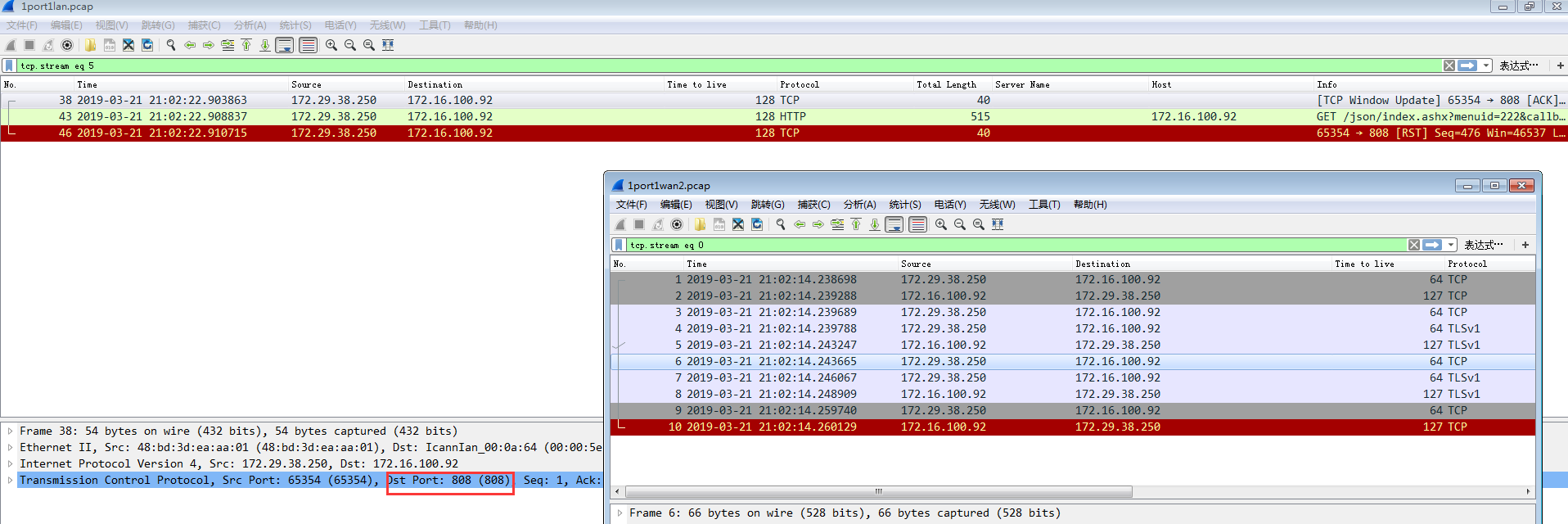
3. Use the packet capture tool in the console to capture the access data packets and analyze them to find that they are proxied by the device port 808
489035c95bd215ad0e.png (136.71 KB)
4.4. Check the configuration and find that the customer has checked [Redirect to the authentication page when HTTPS request fails authentication (except when using proxy)] in the authentication advanced options. Close the test and it is normal
solution
Solution 1: Deselect [Redirect HTTPS requests(not using proxy) to captive portal if user is not authenticated]
Solution 2: Globally exclude this website
Suggestions and Conclusion
[Redirect to the authentication page when HTTPS request fails authentication (except when using proxy)] This function is implemented by the device through SSL proxy. It happens that the customer's website does not support proxy, which causes the website to open abnormally. You can cancel this configuration or globally exclude this website from redirection.
Original Link
https://support.sangfor.com.cn/cases/list?product_id=22&type=1&category_id=6785&isOpen=true