
[IAG] AD domain script single sign-on causes slow startup of users
Problem Description
Users reported that after launching the single sign-on script, it takes ten minutes for the user to enter the account and password before entering the desktop after starting the computer.

179015c02519a5bd63.png (492.39 KB)
Process——
- Check the script placed by AD and find that it is configured as sangfor IP. Confirm that there is no problem with the configuration.
- Open direct connection for test users on the IAG side, but users still start up very slowly
- Confirm with the R&D team and change the parameter EnableRunAlways of the sangforIP script to 0. Send it for testing and the user boots up normally.
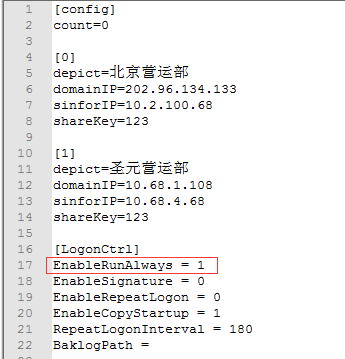
753935c02554093122.png (20.75 KB)
Root cause
The resident memory function of our script is enabled by default. The script resident memory conflicts with the domain, resulting in slow startup.
solution
Modify the parameters in the sinforIP script, change the EnableRunAlways value to 0, turn off the startup resident memory function, run it once and exit
Original Link
https://support.sangfor.com.cn/cases/list?product_id=22&type=1&category_id=6663&isOpen=true