
[IAG] AD domain single sign-on cannot go online, prompting a situation where binding verification failed
Problem Description
The customer's requirement is to bind a domain account to two Macs. The mobile phone uses password authentication to bind the username and Mac, and the computer cannot log in with single sign-on.
Process——
- If you check the option to bind two Macs, and the mobile phone user password authentication has been bound to one Mac, you can use another mobile phone password authentication to bind the second Mac address, but the computer single sign-on cannot go online;
- Check the script execution log in %appdata% and it will prompt the user that the binding verification failed;
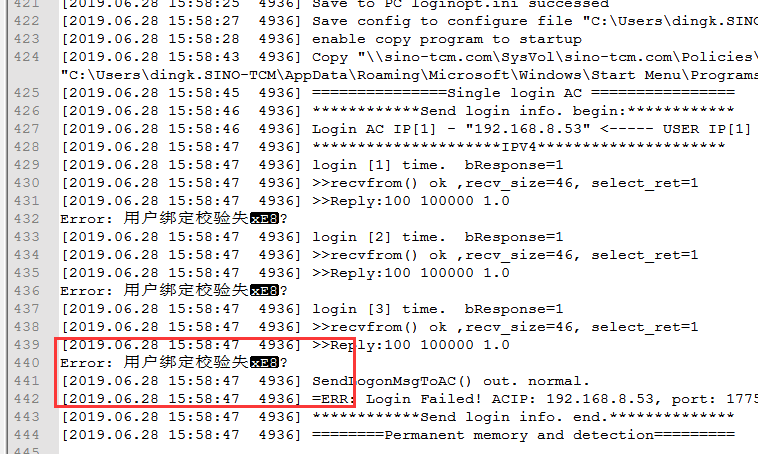
244055d2f3920c8455.png (79.08 KB) - Check that the username is only bound to one Mac address, and the computer password authentication can also be online and bound to the Mac;
- Check the authentication policy. The "Automatically enter binding relationship" option is not checked for the single sign-on authentication policy.
Root cause
If "Automatically enter binding relationship" is not checked for single sign-on, the binding relationship between the user name and Mac will be directly verified instead of entering the binding relationship between the user name and Mac, resulting in user binding verification failure when there is already a binding relationship between the user name and other Macs;
solution
The post-authentication processing of single sign-on requires checking "Automatically enter binding relationship".
Original Link
https://support.sangfor.com.cn/cases/list?product_id=22&type=1&category_id=6975&isOpen=true