
[IAG] After importing the configuration, the bridge address cannot be logged into the console
Problem Description
After 11.r2 configuration is imported into 11.8, the bridge address cannot log in to the device, but the bridge address can be pinged.
Process——
- Connect to the device LAN port only, and you can ping the device, but telnet 443 22345 51111 is not working;
- If you connect to the DMZ port, you can log in using the DMZ port address.
- Capture packets and see that the data packet has reached the IAG. The IAG does not respond to the packet, nor does it respond to the packet from other ports.
- Test that you can log in to the device after modifying the bridge IP.
Root cause
After importing the configuration, the virtual IP address is the same as the bridge IP address. The device bridge address and the virtual address conflict, causing the device to not respond and the console to be unable to log in.
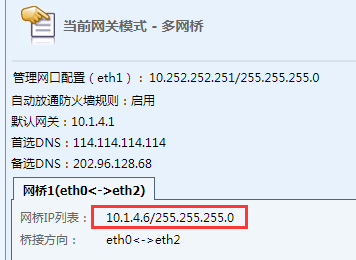
373555b3ec5f0d14bf.png (19.49 KB)
[System Management] – [System Configuration] – [Advanced Configuration]
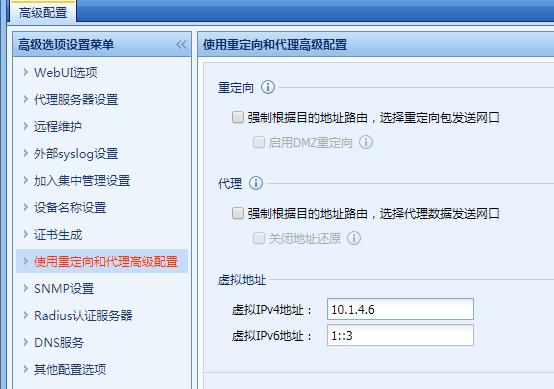
844495b3ec61a5b218.png (44.45 KB)
solution
Log in to the IAG through the management port and change the virtual IP address to another one, then the console can be accessed normally.
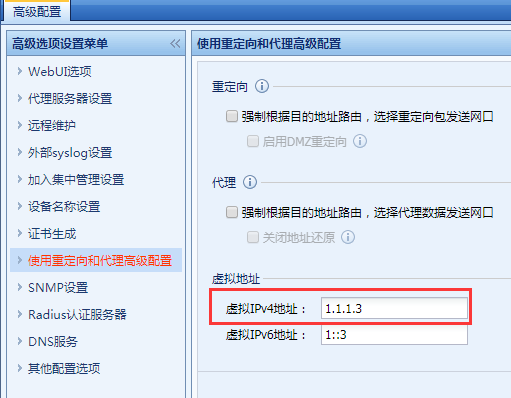
783945b3deea578f9e.png (43.75 KB)
Suggestions and Conclusion
The virtual IP should not conflict with other addresses. It is best to configure an address that does not exist in the intranet.
Original Link
https://support.sangfor.com.cn/cases/list?product_id=22&type=1&category_id=5959&isOpen=true