
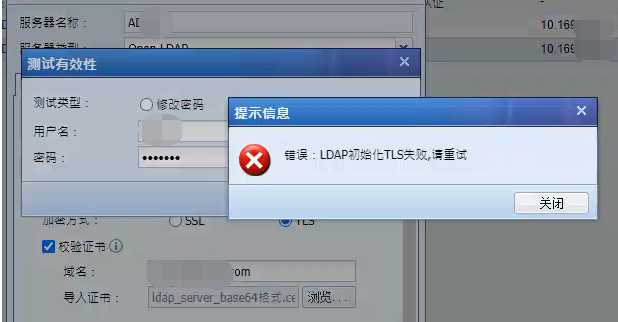
[IAG] After importing the configuration, the ldaps authentication test validity prompts an error: LDAP initialization TLS failed, please try again
Problem Description
After importing the configuration, the ldaps authentication test validity prompts an error: LDAP initialization TLS failed, please try again
Effective troubleshooting steps
- Confirm that the old device is normal. The old device version is 12.0.42, and it is abnormal after importing the 13.0.62 version device
- Uncheck the Verify Certificate option to confirm that the test validity is successful and eliminate network problems
- Comparing the configurations of the two devices, no differences were found in the configurations of the authentication server and ldap server.
- Because the customer required that the certificate verification option must be checked, the certificate related configuration was checked and verified, and it was found that there was no relevant record in the hosts in the network configuration. On the old device, hosts are added
Root cause
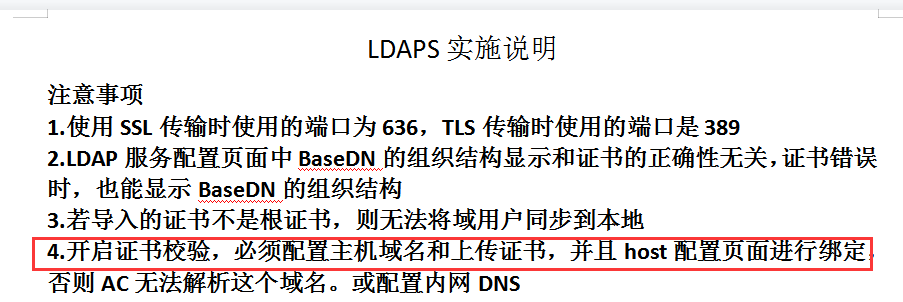
1. To enable certificate verification, you must configure the host domain name and upload the certificate, and bind it on the host configuration page, or configure the intranet DNS. Otherwise IAG cannot resolve this domain name
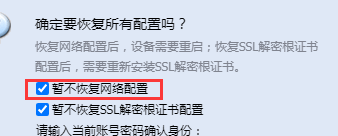
2. When importing the configuration, "Do not restore network configuration for now" was checked, and the hosts configuration belongs to the network configuration
solution
Manually add hosts record solution
Operation Impact Scope
no effect
Original Link
https://support.sangfor.com.cn/cases/list?product_id=22&type=1&category_id=26087&isOpen=true