
[IAG] After importing the user table of versions before 6.1 to 11.X/12.X/13.X devices, the authentication prompt is incorrect password – version incompatibility
Problem Description
I have replaced a device with IAG6.1 with a new one with IAG12.0.12. Now I want to import the local username and password information of the old version into IAG12.0.12.
The local user information of IAG6.1 is exported to a csv table, and the imported form is modified according to the user information format of IAG12.0.12. It is found that the password authentication fails in IAG12.0.12.
Process
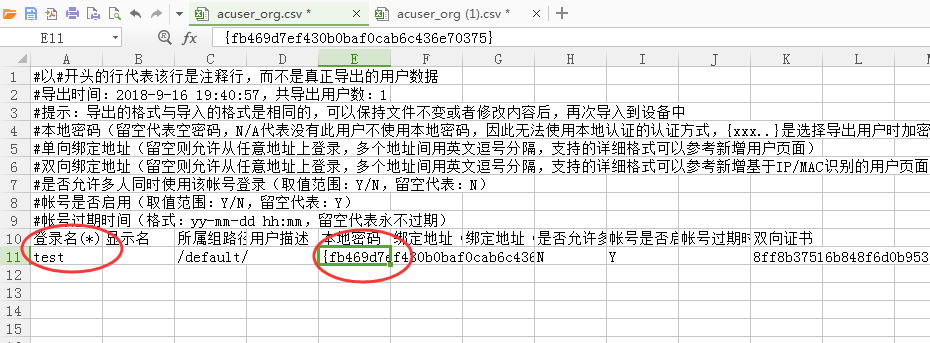
- In the csv table exported from IAG6.1, the password is as shown in the figure below.
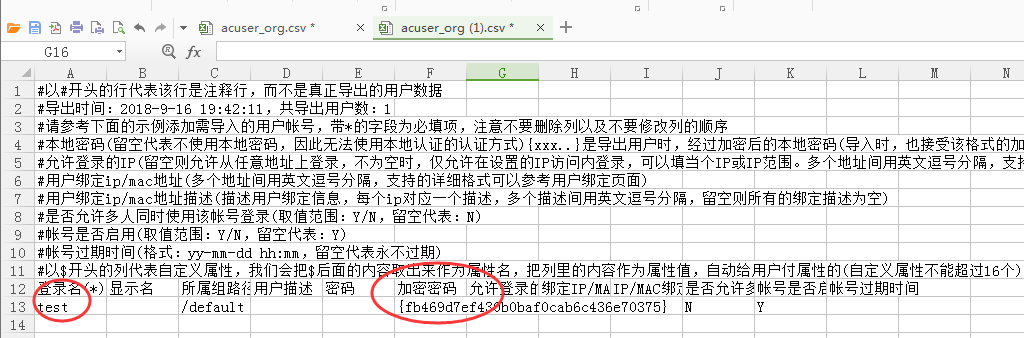
472635b9e4dfa71524.png (49.78 KB) - Export the csv table in 12.0.12, and then copy the information exported in 6.1 to the csv table as shown below.
305935b9e4e42e771a.png (57.27 KB)
Root cause
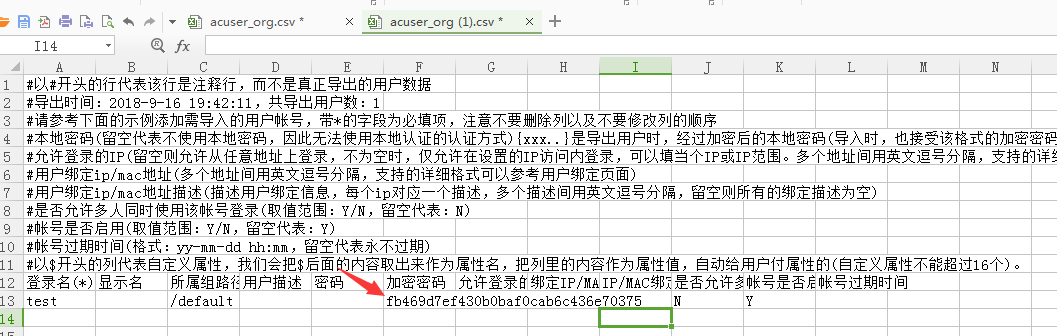
The format filled in the csv table of 12.0.12 is wrong. The local password in the csv table of 6.1 is an encrypted password. When copying it to the encrypted password column of 12.0.12, you need to remove {} to get the encrypted password of 12.0.12. This operation is required when importing version 6.1 into version 11.x or above.
solution
Just delete {}, as shown in the figure below, and the authentication will be successful.
556585b9e4f67a19e0.png (53.8 KB)
Original Link
https://support.sangfor.com.cn/cases/list?product_id=22&type=1&category_id=6466&isOpen=true