
[IAG] After installing the access plug-in, a certain computer frequently prompts to install the plug-in
Problem Description
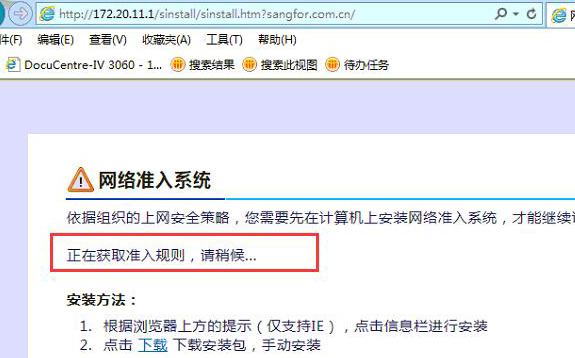
When a browser is opened on a computer in the intranet, a prompt appears saying that an access plug-in needs to be installed. The plug-in has been installed and the access service is running normally.
Warning Information
831805b406d322c75e.png (148.87 KB)
Process——
- Take the access log analysis, the following is the directory of the access log
32-bit operating system: C:\WINDOWS\system32\config\igslog
64-bit operating system: C:\Windows\SysWOW64\config\igslog - Check the Client.log file of a company, and the log contains the following error:
rule file=C:\Windows\Temp\permitconfig
open file error, errno=5
#wtd recv tcp data error = -3, 5

215215b406ea9ee63e.png (8.49 KB)
3. The error message means: the SYSTEM account of the terminal PC does not have read and write permissions under C:\Windows\Temp\permitcon.
Root cause
The SYSTEM user lacks read and write permissions for the C:\Windows\Temp\ folder. Because the ingress process runs as the system account, files are written through the system account.
solution
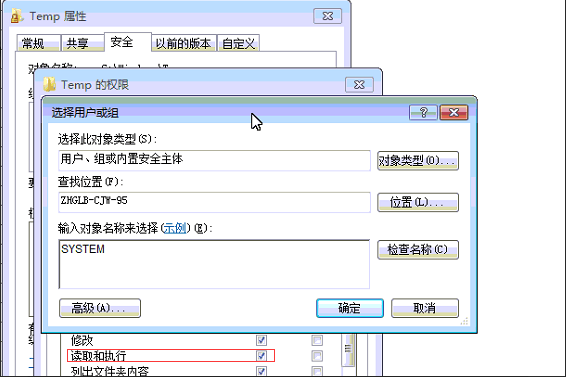
- Manually fill in the read and write permissions for the SYSTEM account. If you right-click the C:\Windows\Temp\ folder – Properties – Security – and do not see the SYSTEM account, manually add this account, then grant read and write permissions, and finally restart the access service.
802735b40710529791.png (56.06 KB)
Original Link
https://support.sangfor.com.cn/cases/list?product_id=22&type=1&category_id=5976&isOpen=true