
[IAG] After the user password authentication is successful, the authentication page pops up again–MAC acquisition across three layers fails
Problem Description
After the password authentication prompt is successful, you need to re-authenticate when you open the webpage again
Process
-
The password authentication prompt is successful, but when you open the webpage again, it jumps to the authentication page. After checking, it is found that there is no online user.
-
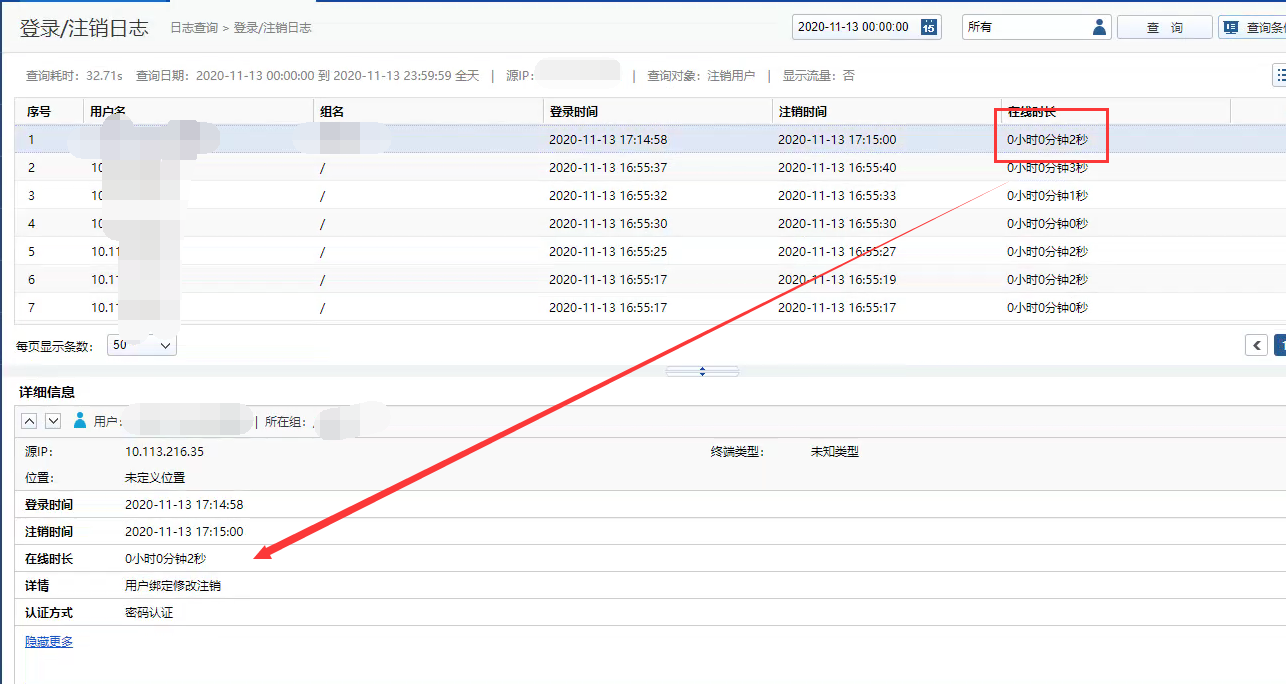
Check the login and logout logs and find that the user logged in successfully and then logged out. The reason for the logout is that the user binding relationship was modified and logged out, as shown in the following figure
486495fb1306f0d07a.png (319.95 KB) -
Check the authentication policy and check whether the binding relationship between the user name and MAC is automatically entered. Check and find that no binding relationship is entered locally. Then check the span three layers. Although it is configured to span three times, the span three layers is unsuccessful, resulting in the failure to obtain the correct mac address.
Root cause
Failure to cross three layers
solution
Configure the normal cross-layer 3 so that the MAC address can be obtained normally and then restored to normal
Original Link
https://support.sangfor.com.cn/cases/list?product_id=22&type=1&category_id=7602&isOpen=true