
[IAG] All user access rights policies are checked for the applicable object, but the association still cannot be performed
Problem Description
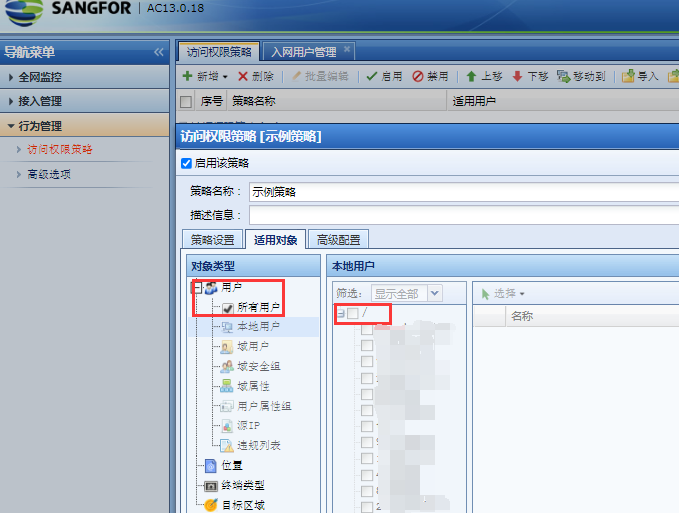
Customer feedback: The applicable objects of the access rights policy of the whole network IAG13.0.18 version are associated with all users, but the users cannot match the sample policy.
Warning Information
The applicable object is associated with all users, but the users do not match the sample policy
Effective troubleshooting steps
- Check the customer's problem phenomenon. The online user finds that the user checks the policy result set and finds that it does not match the sample policy.
- Check that the access permission policy applies to all users.
- Carefully click to view the applicable object configuration and find that the customer has checked all users, but all other groups in all users are not checked. Uncheck all users and select the groups the customer needs, and everything will be normal. The details are as follows:
Root cause
First uncheck all groups and then check all users, which results in the policy not being associated.
solution
Check all the groups that need to match the policy and then select all users or associate them directly with the group.
Original Link
https://support.sangfor.com.cn/cases/list?product_id=22&type=1&category_id=7934&isOpen=true