
[IAG] An error occurs when pasting a MAC address in [Authentication Policy] – [Applicable Scope]
Problem Description
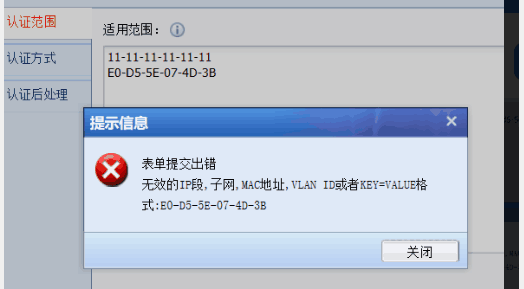
An error message appears when pasting the MAC address in [Authentication Policy] – [Authentication Scope]
Process——
- Open the xls form sent by the customer with wps and copy the MAC address in it to the authentication range. An error message appears when submitting, but after checking, no problem is found.
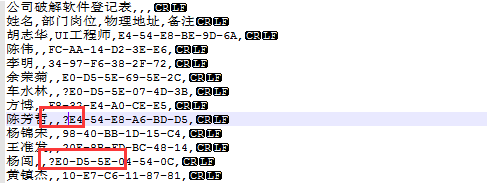
25015e741a13cfbf7.png (20.51 KB) - Open the form with notepad++ and find that there is an extra question mark in front of the MAC address. Delete the question mark, open it with wps, copy the mac address and fill in the certification scope to restore to normal
921645e741b16843c2.png (18.72 KB)
solution
The mac address in the xls file contains special symbols, which cannot be seen with wps. Open it with notepad++, delete the special symbols, and paste it again to restore it to normal
Original Link
https://support.sangfor.com.cn/cases/list?product_id=22&type=1&category_id=7381&isOpen=true