
[IAG] An IP cannot be accessed, and the direct connection prompts that the port control packet is lost
Problem Description
One IP cannot be accessed, but it can be accessed normally after enabling direct access. Direct access prompts that the port control is losing packets. However, when I checked the policy of the user in the group and user, I found that there was no port control policy at all.
Process——
- Check the user's policy in the group and user, and find that there is no port control policy.
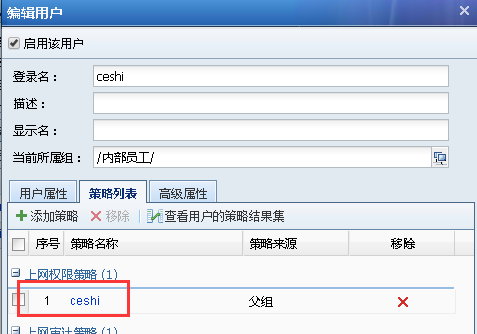
538505cbab78a799ce.png (20.34 KB)
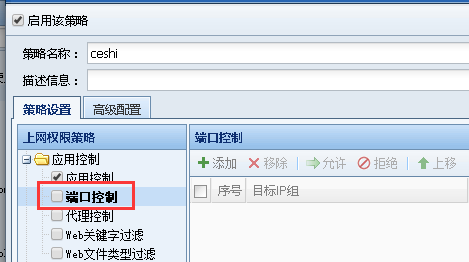
25575cbab7c62207d.png (15.33 KB) - Ping the IP in the terminal and find that the ping is not working. During Internet troubleshooting, turn on data pass-through for the terminal and find that it is normal, and prompt port control packet loss.

970915cbab8306fd13.png (27.47 KB) - Check the policy matched by the user in the online user management and find that the user also matches a port control policy, and the target IP happens to be the inaccessible IP.
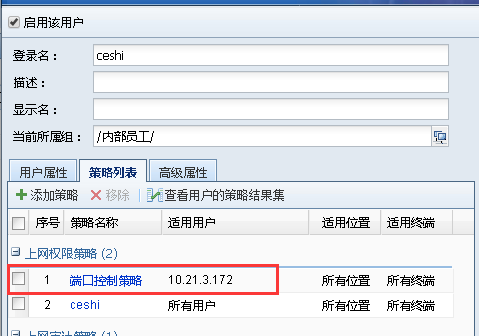
316585cbabaf80394f.png (17.83 KB)
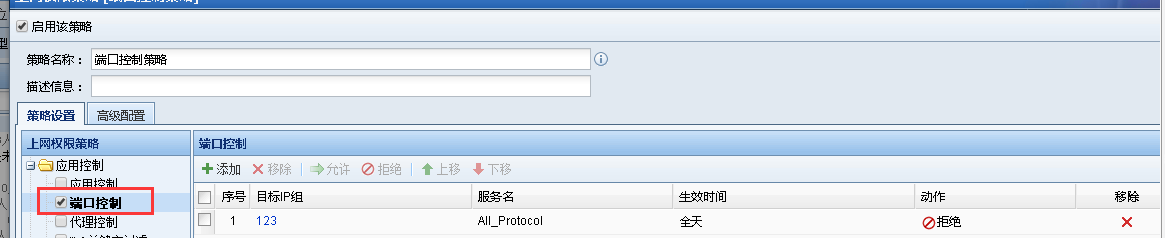
877595cbabb198b634.png (23.92 KB) - Check the users that match the port control policy and find that the applicable user selects the source IP, which happens to be the IP of the terminal PC.
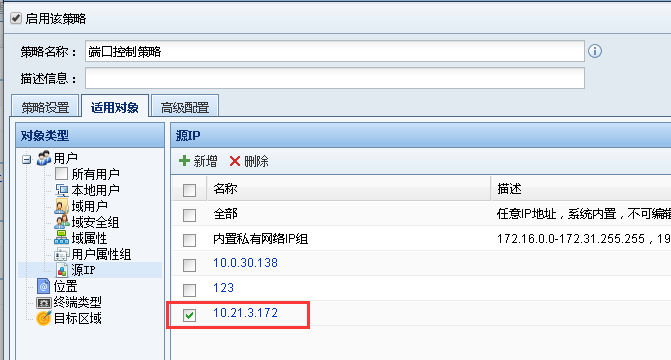
540825cbabbe25f682.png (26.65 KB) - Uncheck the IP address and check the matching policy in the online user again. It is found that the user does not match the port control policy and the access is normal.
Root cause
This is because the applicable user selected by the port control policy is the source IP, and the group and user search policy only displays the policy matched by the user, while the policy actually matched by the user is a collection, that is, the source IP and the user's policy collection. The policy actually matched by the user is based on the policy matched by the online user.
solution
Solve the problem by unchecking the IP in the port control policy.
Original Link
https://support.sangfor.com.cn/cases/list?product_id=22&type=1&category_id=6899&isOpen=true