
[IAG] Anti-sharing does not work – caused by adding a trust list
Problem Description
[attach]373481[/attach]IAG has enabled shared access management, but cannot detect shared Internet access behavior
Process——
- Check the anti-sharing configuration and select statistics for all terminals.
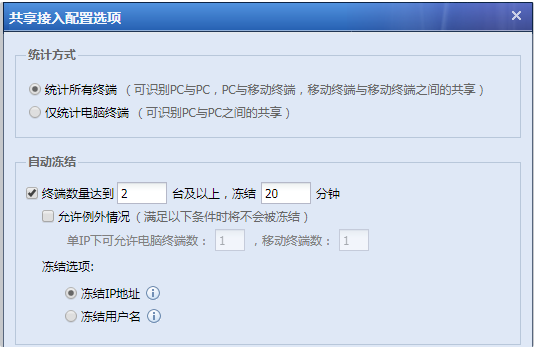
723345d381b6893b5e.png (39.71 KB) - However, the current view shows that the user's sharing behavior cannot be detected. Turn on the hotspot on the PC and test the connection of the mobile phone to the hotspot. I kept refreshing the web page on my PC and watched Tencent Time and Youku videos on my mobile phone. I found that the sharing behavior was still not recognized.
- Check that the IP address is not included in the global exclusion address. Checking the trust list of shared detection, it is found that the intranet segment is excluded from the trust list
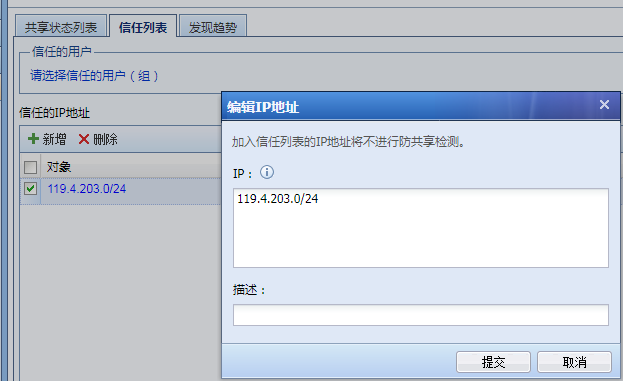
596135d381a6c0589b.png (34.09 KB) - After removing the network segment from the trust list, everything is normal and the anti-sharing behavior can be detected normally.

947205d381ae097e74.png (258.36 KB)
solution
The intranet segment is added to the anti-sharing trust list. After removing the corresponding intranet segment, the sharing behavior can be identified
Original Link
https://support.sangfor.com.cn/cases/list?product_id=22&type=1&category_id=6999&isOpen=true