
[IAG] Authorization fails when the number of vIAG network ports is less than 3
Problem Description
Problem 1: After vIAG authorization, the lower right corner still prompts "Unauthorized" (fundamental problem)
Problem 2: Authorization failure directly causes the Internet access policy to be unable to associate with the user
Warning Information
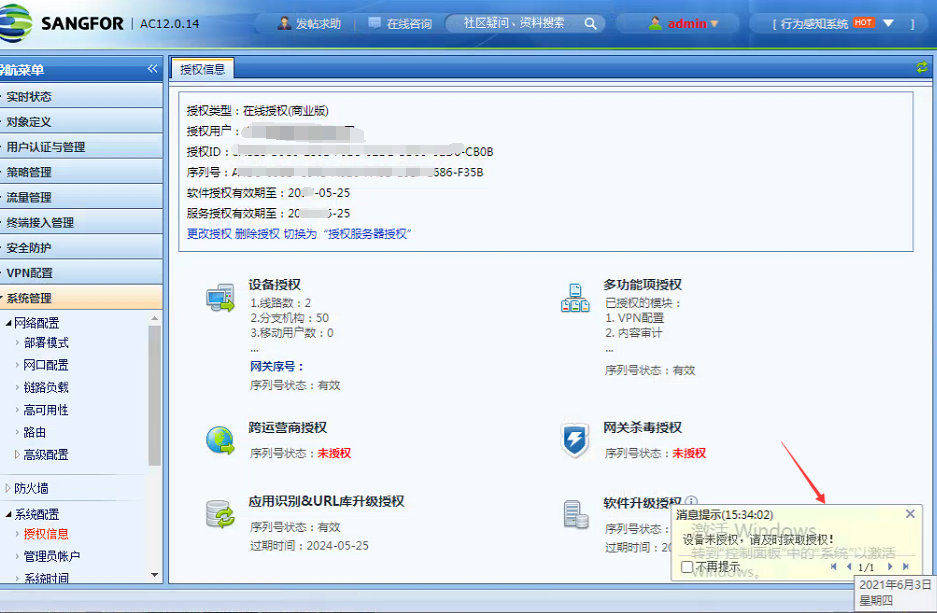
Effective troubleshooting steps
- Authorization ID and storage and transportation verification are normal
- However, the device only has two network ports, ETH0 and ETH1, which causes the device authorization to detect an abnormality
Root cause
Device authorization logic: Normally, device authorization generation and detection are based on the hardware information of ETH0 and ETH2 ports. However, if the device has only two network ports (eth0 and eth1), online authorization will succeed, but the device detection logic will fail, indicating that the device is not authorized.
solution
Add another network card to ensure that the device has an ETH2 port and the authorization is successful.
Suggestions and Conclusion
When deploying vIAG, you need to configure three or more network ports on the device in advance to avoid such authorization failures.
Original Link
https://support.sangfor.com.cn/cases/list?product_id=22&type=1&category_id=8104&isOpen=true