
[IAG] BA_Multi-branch application access alarm-version number is less than 12.0
Problem Description
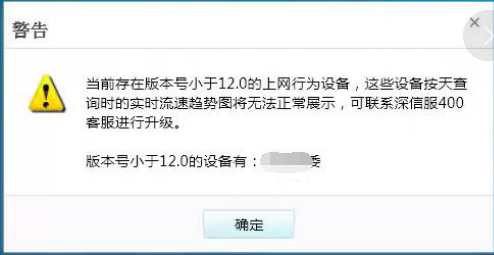
Multiple branch application access alarm in BA, version number is less than 12.0
Warning Information
638735b2c5a7024a76.png (65.5 KB)
Process——
Confirm the IAG device version, confirm it is version 12.0 or above
Root cause
The tcp801 port between IAG and BA server cannot communicate.
solution
- Open TCP port 801 between IAG and BA server
When the port is enabled, the problem is usually not solved immediately because the IAG only sends version information to the BA once a day. Therefore, it takes time to wait until the next day for the problem to take effect, or the IAG device can be restarted.
2. If there are many branches, or the problem is not solved after restarting, then the following is the last resort:
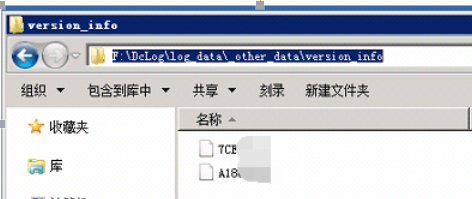
Processing method: See the path below
259825b2c5aa95aaa4.png (102.02 KB)
If there is no version_info folder, create it manually and add an empty file named after the gateway ID of the problematic IAG in the version_info folder. Restart all services.
If there is a version_info folder but no corresponding gateway id file, add an empty file named after the problematic IAG gateway id and restart all services.
Original Link
https://support.sangfor.com.cn/cases/list?product_id=22&type=1&category_id=5932&isOpen=true