
[IAG] Cisco and IAG cannot connect to each other as third-party VPN
Problem Description
Cisco and IAG cannot connect to third-party VPN
Process——
1: [System Management] – [System Configuration] – [System Log] Check the DLAN log prompt: The first phase of negotiation failed, please check the advanced configuration
2: Check the first phase configuration of this end as follows:
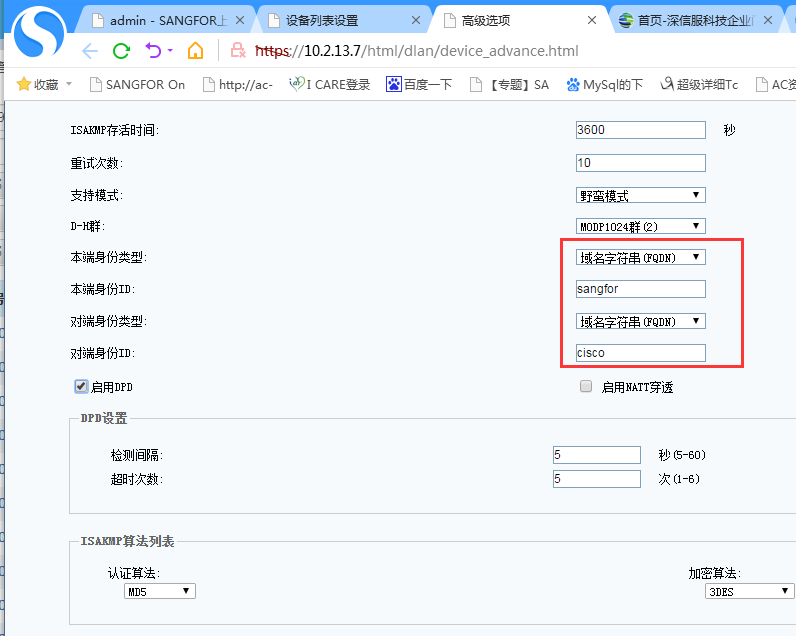
854095c9b9bee086a2.png (53.61 KB)
3: Look at the identity type configured on the peer Cisco as USER_FQDN;
4: Change the IAG identity type to USER_FQDN and connect normally
Root cause
VPN connection failure caused by inconsistent identity types at both ends
solution
Change the identity types on both sides to be consistent. You can also change Cisco's identity type to FQDN.
Suggestions and Conclusion
The basic parameters that both parties of the third-party VPN require to be consistent are as follows:
The peer IP, connection mode, shared key, DH group, authentication algorithm, identity type, perfect key (PFS), ipsec protocol, inbound and outbound
Note: A certain company currently only supports IKEV1 version
Original Link
https://support.sangfor.com.cn/cases/list?product_id=22&type=1&category_id=6817&isOpen=true