
[IAG] Combined with Ruijie for single sign-on, the terminal is redirected to 1.1.1.3 after connecting to wireless
Problem Description
Feedback: A new wireless SSID signal was created. After the user accesses the wireless network, it is always redirected to 1.1.1.3
Effective troubleshooting steps
- Confirm that 1.1.1.3 is the virtual IP address of the device bridge and the redirection packet sent after matching the authentication policy
- The authentication policy configuration is single sign-on. If it fails, it will redirect to the authentication page. The authentication page is set to the IAG bridge IP authentication page.
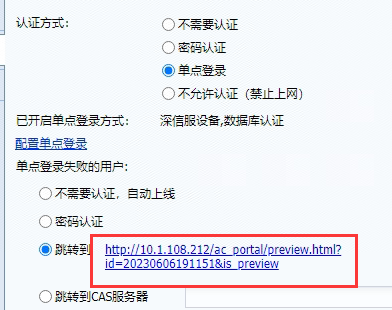
- The customer's site uses single sign-on in conjunction with Ruijie. After confirmation with the customer, the authentication server is located in the WAN port direction of the device. That is, after the user accesses the wireless network, the wireless controller sends a redirection packet to allow the terminal to access the public network authentication server; this packet is intercepted by the IAG, matching the jump setting after single sign-on failure in the authentication policy, and sends a redirection to allow the user to access the device's management port IP; the device's management port IP is also in the WAN port direction, and access to the device's management port will also be redirected to 1.1.1.3
- After adding the authentication server address to the global exclusion, confirm that the problem is solved
solution
Globally exclude the authentication server in the WAN direction
Original Link
https://support.sangfor.com.cn/cases/list?product_id=22&type=1&category_id=23866&isOpen=true