
[IAG] Configure domain monitoring single sign-on, and now the user single sign-on fails
Problem Description
IAG11.2R1 user configured domain monitoring single sign-on, but user single sign-on failed
Process——
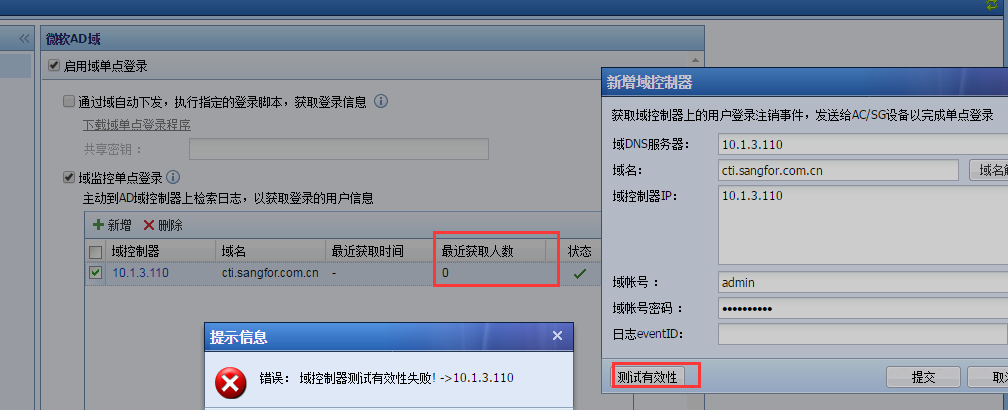
- Check the configuration on the IAG. The authentication policy selects single sign-on, and domain monitoring single sign-on is checked in the single sign-on.
- The number of users recently obtained in the domain monitoring option is found to be zero, and the test validity prompt fails.
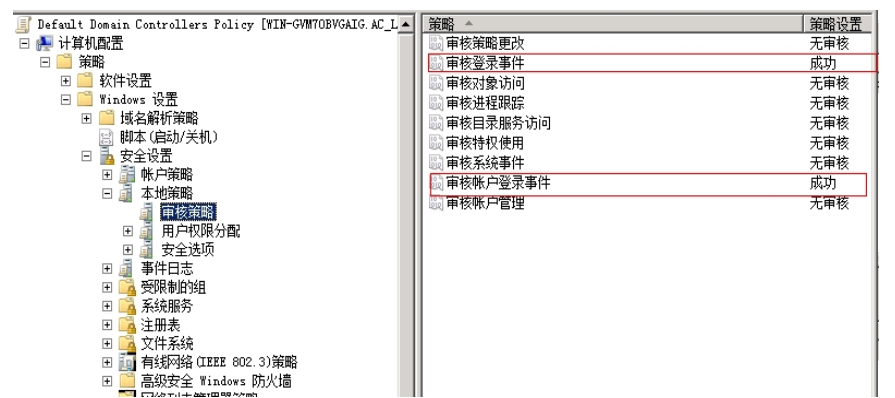
123595b642b9f8f278.png (58.27 KB) - Check that the audit log in the domain server is turned on
797045b642c0013177.png (124.7 KB) - Finally, check that the domain account has insufficient permissions and change it to an administrator account.
Root cause
The domain account does not have permission to scan the security log in the domain server
solution
Change the domain account to an account with permissions
Suggestions and Conclusion
In the future, when selecting domain accounts for domain monitoring single sign-on, it is recommended to use the administrator account for testing.
Original Link
https://support.sangfor.com.cn/cases/list?product_id=22&type=1&category_id=6201&isOpen=true