
[IAG] Configuring AD domain single sign-on, single sign-on with sinforIP file failed
Problem Description
Configuring AD domain single sign-on, single sign-on with sinforIP file failed
Effective troubleshooting steps
- Test that the PC can log in normally by executing the script pointing to the IP of IAG.
- If single sign-on using sinforIP fails, check that the group policy has issued the logon script and sinforIP normally.
- Check the single sign-on log file directory C:\Users\Domain Username\AppData\Roaming.logon directory for sinforip configuration files
- Check the sinforIP configuration file and find that the IAG name corresponding to the configured single sign-on IP is incorrect.
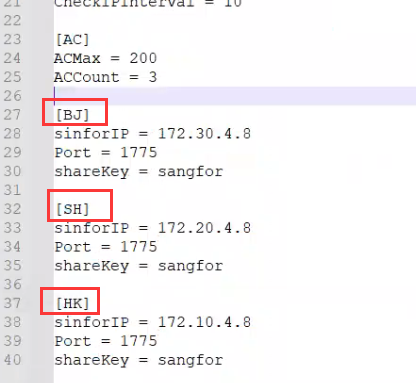
- It is recommended to change to IAG1-IAG2-IAG3, and then issue sinforIP to test the success of single sign-on
Root cause
sinforIP configuration file configuration error
solution
Modify the sinforIP configuration file configuration solution
Original Link
https://support.sangfor.com.cn/cases/list?product_id=22&type=1&category_id=25005&isOpen=true