
[IAG] Configuring NAT proxy to access the Internet does not take effect
Problem Description
The device is deployed in routing mode of IAG12.0.7. Adding a LAN port and configuring NAT proxy to access the Internet does not work and the Internet cannot be accessed.
Process——
- The previous network segment is 192.168.100.0/22. You need to configure the NAT proxy Internet access network segment to 172.100.100.0/22 in the firewall module.
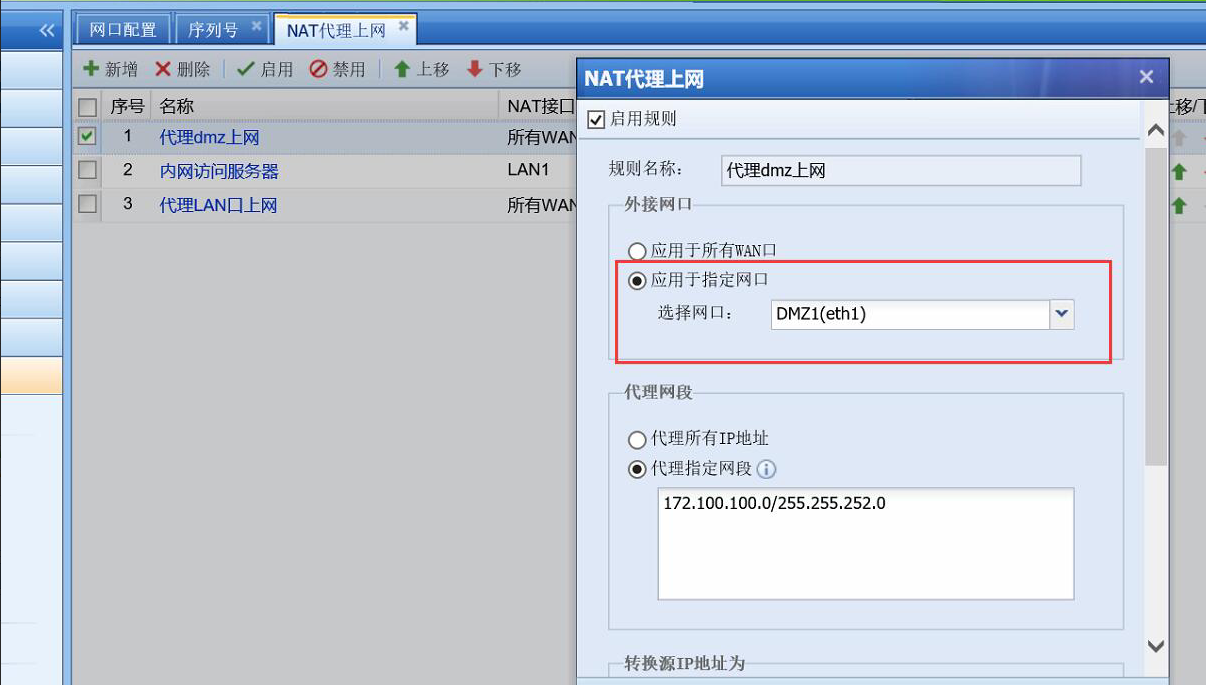
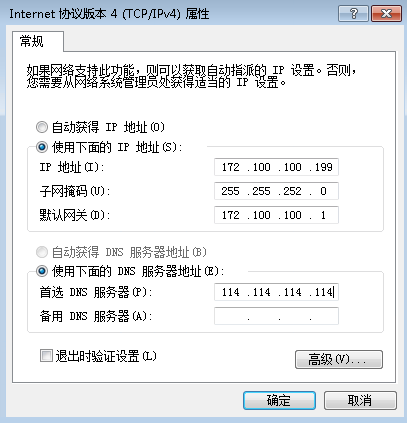
541075b531063c8f97.png (273.85 KB) - Use PC to connect to ETH1 port and configure IP address to 172.100.100.199/22, but PC cannot access the Internet
647355b5311045fbb4.png (22.78 KB) - Use arp on the device command console to check that the MAC address can be obtained and the device can ping the PC.
- Check the authentication policy to see that no authentication is required and all Internet access policies are disabled. Still unable to access the Internet
- Disabling anti-ARP spoofing and anti-DOS attack does not help
- I can access the Internet after starting the direct test, but it prompts that the user authentication packet is lost. The English prompt shows user block
- Why is the user prompted to lock when no authentication is required? I checked the IP and MAC binding and found that the previous binding relationship caused the inability to access the Internet.

101235b5313096f426.png (244.7 KB)
Root cause
Because the MAC of the test PC has been bound to an IP address before the intranet, the binding relationship between the IP and MAC causes the inability to access the Internet, not because NAT is ineffective.
solution
Delete the binding relationship, close the direct connection, and restore normal Internet access
Suggestions and Conclusion
If the device network configuration does not take effect, it is best to enable direct connection to see if it takes effect, so as to avoid detours. In many cases, it is caused by the previously configured policy interception.
Original Link
https://support.sangfor.com.cn/cases/list?product_id=22&type=1&category_id=6045&isOpen=true