
[IAG] Custom applications cause Internet access policy control to fail to take effect
Problem Description
After the authentication of the newly added intranet segment 192.168.0.0 goes online, any Internet access policy control will not take effect
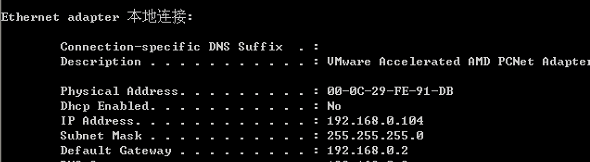
554405ba0d13f00dfd.png (23.91 KB)
Process——
- Denying all applications to this IP address is effective, but specific applications cannot be denied. 。
- The global exclusion is empty and direct pass is not enabled.
- Query the user traffic ranking and find that there is only one DingTalk application.
Root cause
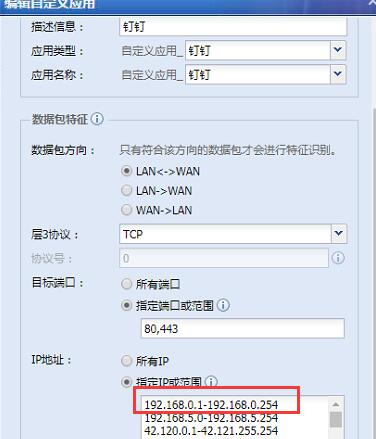
After checking the configuration, I found that the customer customized the application as shown below and added the intranet IP address. 。 。 As a result, the application cannot identify the specific application, and the customer just allows customized DingTalk, so the policy control is not effective.
519615ba0d18a5be87.png (139.25 KB)
solution
The problem can be controlled by removing the intranet IP in the custom application.
Suggestions and Conclusion
When you customize an application, you need to be cautious when filling in the IP address. Try not to fill in the private IP address to avoid application identification failure and inability to control the application.
Original Link
https://support.sangfor.com.cn/cases/list?product_id=22&type=1&category_id=6481&isOpen=true