
[IAG] Data center export report shows all users/groups but logs are not available, subgroup logs are available
Problem Description
The data center exported report shows all users/groups, but the logs cannot be found. The sub-group logs in the report are displayed normally, as shown below:
All users/groups are displayed, but no logs can be found:
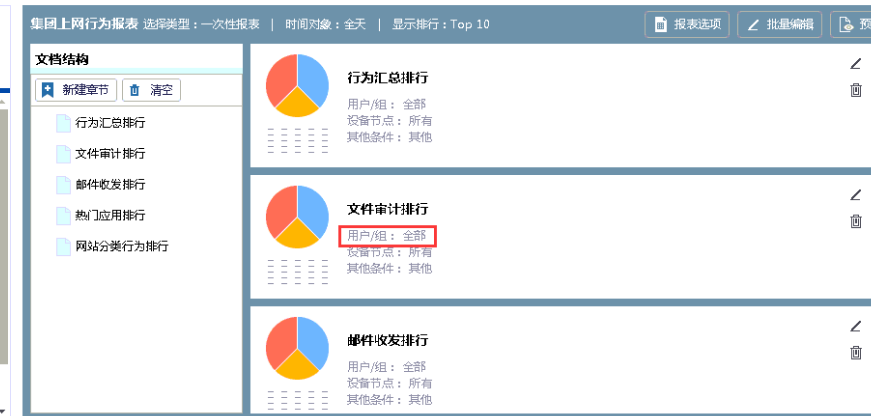
313325d635f1363336.png (60.54 KB)
Query the following subgroups to see if there are logs available:
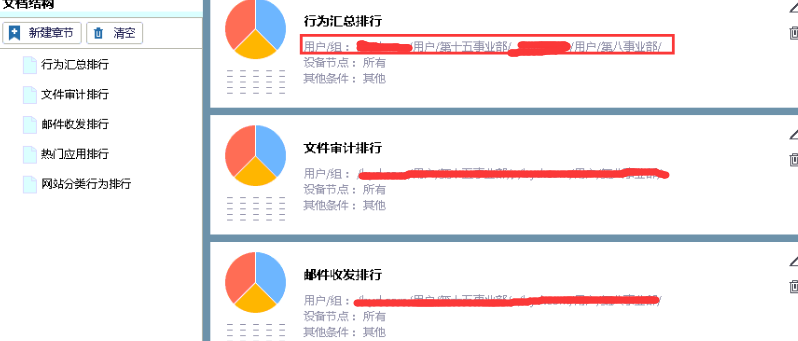
477885d635f3870407.png (56.44 KB)
Process——
- Check the configuration of the query root group as follows:
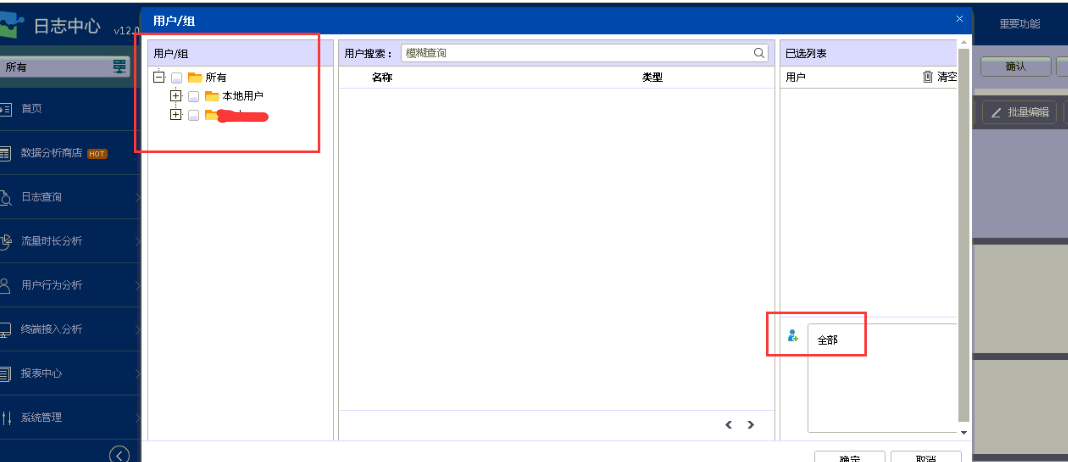
647885d635f907b2a2.png (47.82 KB) - I found that the customer organization structure was not checked, but a user name of "All" was written in the lower right corner, which caused the user/group area to show "All" when we looked at the report.
- In the upper left corner, select the organizational structure as all and you can query it normally.
Root cause
When generating the report, the organizational structure must be checked. The lower right corner only filters the logs of a single user or a part of special users, which allows users to filter certain users.
solution
When generating the report, just select the organizational structure.
Original Link
https://support.sangfor.com.cn/cases/list?product_id=22&type=1&category_id=7110&isOpen=true