
[IAG] Deployed in bypass mode, a PC in the intranet cannot audit logs
Problem Description
The IAG bypass mode is deployed. One PC in the intranet cannot audit the Internet behavior log. Other PCs are normal.
Process——
- Check whether the user has made an audit policy and find that the audit policy is fully enabled. Check that the user is not included in the global exclusion
- Use the packet capture tool on the IAG device to capture data packets and view them. Capture all data packets at the address and refresh the web page continuously during the packet capture process.
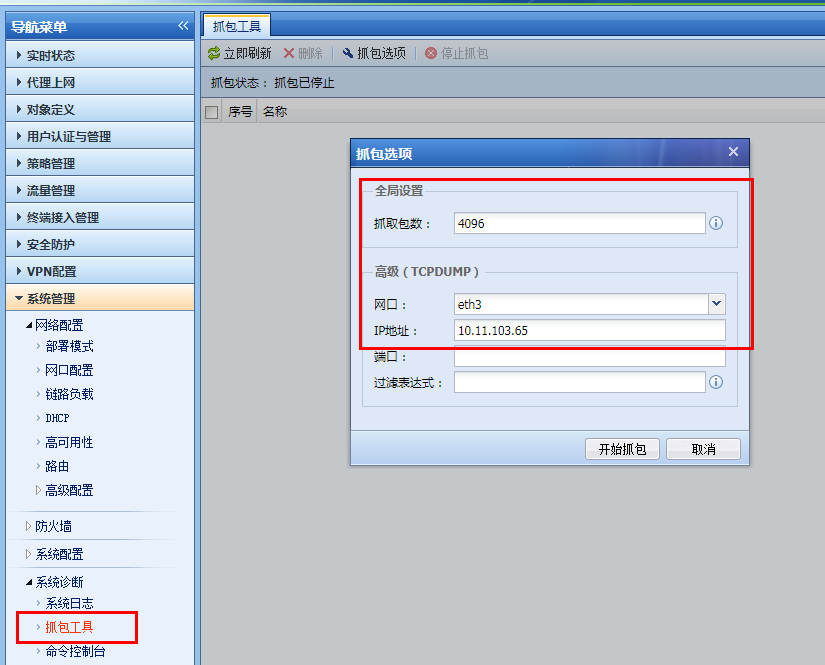
294585c08c4203b5ba.png (66.96 KB) - After capturing the data packets, use wireshark to open the data packets and find that the address 10.11.103.65 only has data packets communicating with 10.11.1.5, and the data packet port of 10.11.1.5 is port 8080. It is judged that the address 10.11.103.65 may go through the proxy of 10.11.1.5. After verification, it was confirmed that the agent was used.

344225c08c4f5c8b9e.png (75.15 KB) - The monitoring network segment filled in the deployment mode of the device is 10.11.0.0/16. These two addresses also belong to the intranet segment, so the data will not be audited by the device.
- Adjust the network environment so that the PC does not use a proxy solution. After the adjustment, this PC can audit the logs normally in bypass mode.
solution
Adjust the network environment so that the PC does not use the proxy solution
Original Link
https://support.sangfor.com.cn/cases/list?product_id=22&type=1&category_id=6666&isOpen=true