
[IAG] DHCP is enabled in IAG routing mode deployment, intranet layer 2 environment, intranet users cannot access the Internet – DHCP configuration error
Problem Description
The IAG routing mode is deployed with DHCP enabled, and in the intranet Layer 2 environment, intranet users cannot access the Internet.
Process——
- The terminal device needs to obtain the IP address assigned by the IAG as a DHCP server, and the terminal can obtain the address through DHCP normally.
- However, the PC cannot ping the external network 114.114.114.114. After checking, it is found that there is a problem with the gateway obtained by the PC.
- Check the DHCP configuration on the IAG. As shown in the figure below, the device LAN port address is 10.1.3.40, but the configured gateway is 10.1.3.1, which does not exist.
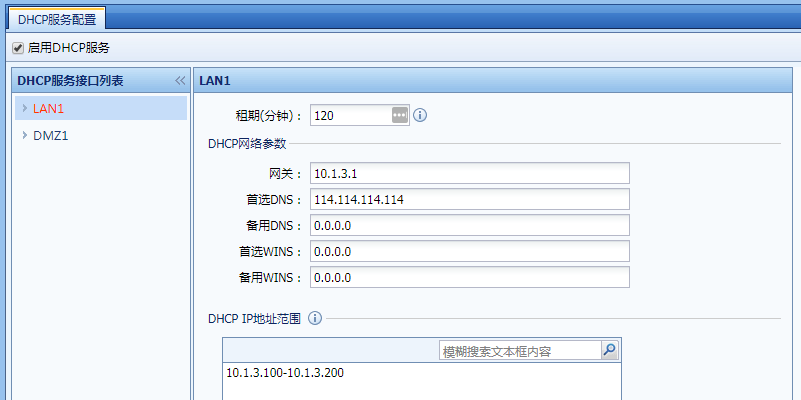
564275b80bdfe10db0.png (32.84 KB)
Root cause
The DHCP gateway configuration is incorrect.
solution
Modify the DHCP gateway configuration to the IAG's LAN port address, and then test it normally.
Original Link
https://support.sangfor.com.cn/cases/list?product_id=22&type=1&category_id=6393&isOpen=true