
[IAG] DingTalk authentication failed on some mobile phones, and the DingTalk client could not be launched
Problem Description
DingTalk authentication failed on some mobile phones, and the DingTalk client could not be launched
Effective troubleshooting steps
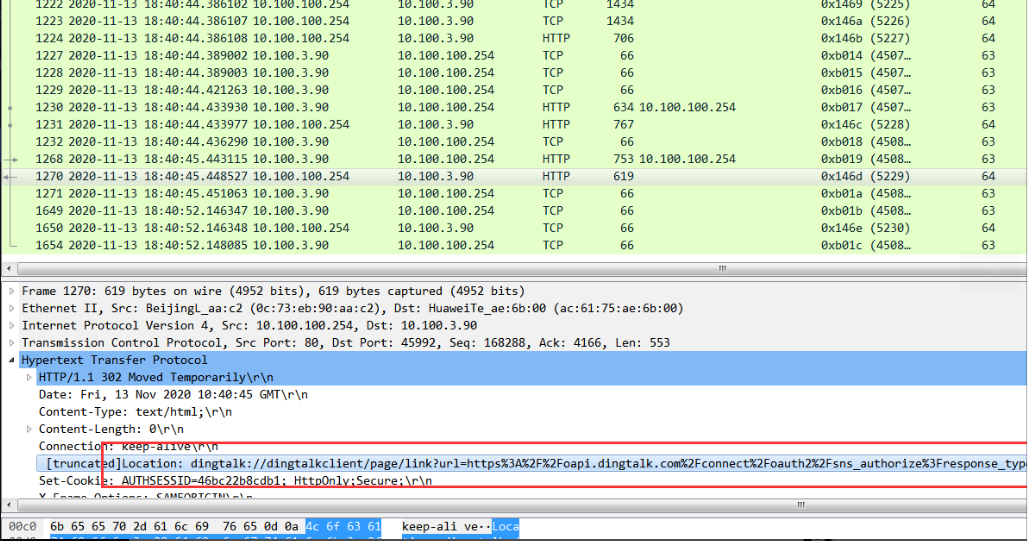
- After capturing the data packets for analysis, we found that IAG redirected the DingTalk connection to the mobile phone. As shown in the following figure, this link starts with dingtalk://, not the common http or https.
Root cause
dingtalk://This link is a dedicated connection for the DingTalk client (it is fixed). It belongs to DingTalk's own rules and is not unique to IAG. If you capture the packet and find that it has been redirected, but the mobile phone has no response, you can try to copy this link and let the mobile phone actively access it to see if it can be pulled up normally. If it still cannot be pulled up normally, it is generally because of some reasons on the mobile phone that it cannot be pulled up. In this case, you can change the browser and verify it. Generally, the browser is the most likely reason. In addition, if the mobile phone does not have the DingTalk software installed, redirecting this link will definitely be useless.
solution
After the customer changed the browser, the verification was successful in launching the DingTalk client.
Original Link
https://support.sangfor.com.cn/cases/list?product_id=22&type=1&category_id=8243&isOpen=true