
[IAG] DNS proxy policy is configured to specify the DNS server, and the domain name cannot be resolved normally
Problem Description
The DNS proxy policy is configured to specify the DNS server, and the domain name cannot be resolved normally
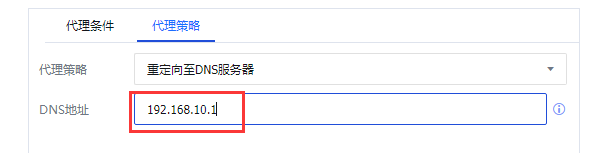
Effective troubleshooting steps
- Confirm that the device is not open for direct access and global exclusion
- The DNS proxy policy configuration does not select the custom URL group
- Check if the DNS server of the PC is the public network DNS server, and capture the packet to confirm that the data is transmitted through the IAG.
- Capture the packet on the IAG again and analyze it. Confirm that the IAG has received the DNS request packet sent by the PC. The device has also sent the DNS request packet to the specified DNS server, but has not received the reply packet from the specified DNS server.
Root cause
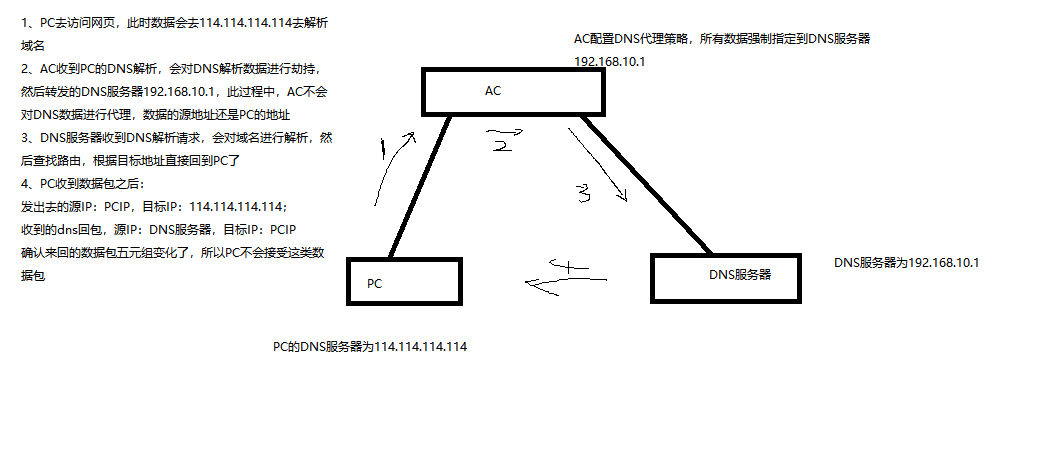
The response data exchanged between the specified DNS server and the PC does not pass through the IAG, resulting in different five-tuple data between the PC and the DNS.
solution
- Adjust the data flow direction between the PC and the DNS server to pass through the IAG in both directions. You can put the DNS server in the direction of the IAG's WAN port.
Suggestions and Conclusion
In routing mode, do not capture any port on the IAG using the tcpdump command. It is recommended to capture packets on the corresponding network port based on the destination address route.
Original Link
https://support.sangfor.com.cn/cases/list?product_id=22&type=1&category_id=25784&isOpen=true