
[IAG] Domain monitoring single sign-on cannot obtain users
Problem Description
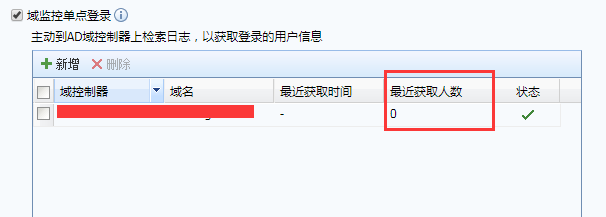
After configuring the domain monitoring single sign-on, I found several PCs in the intranet and logged out again, but found that IAG still kept prompting that the user could not be obtained.
Warning Information
167425b644f942c9a6.png (15.82 KB)
Process——
- Check that the username and password are authorized
- Use the webmtest tool to test the connection on the domain-joined PC and find that the connection prompt is denied access
- Capturing data packets on the PC shows access denied

216765b644f6c37dc3.png (68.79 KB) - Log in to the AD domain server and remove the IAG address restriction from the firewall. Then, log in to the AD domain server and obtain the user account normally through single sign-on.

289655b645077ec315.png (5.9 KB)
Root cause
The AD server has a firewall turned on and rejected the connection
solution
After the AD domain server releases the IAG address restriction from the firewall, single sign-on can obtain users normally.
Original Link
https://support.sangfor.com.cn/cases/list?product_id=22&type=1&category_id=6194&isOpen=true