
[IAG] Domain script single sign-on users go online slowly, causing the built-in prompt page to be displayed when opening the web page
Problem Description
The IAG device is configured with single sign-on authentication policy. If single sign-on fails, it will jump to the built-in prompt page.
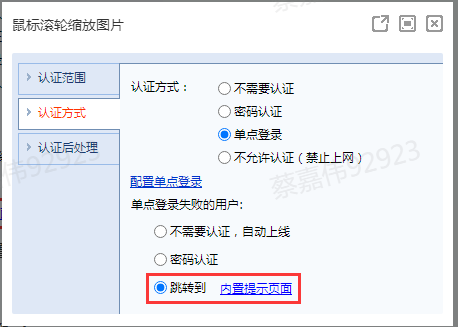
56365f0fb51e3be04.png (24.94 KB)
After the terminal PC is turned on, opening the browser will jump to the built-in prompt page, but at this time the user has actually logged in through single sign-on
Process——
- Online users see that the user has logged in through single sign-on.
- Open another window on the terminal PC's browser, and you can actually access the Internet directly.
- Check the logon script log to confirm that there is no problem
Root cause
It is inferred that the data packet of the script single sign-on is slower than the packet of the user opening the browser, resulting in the single sign-on not being successful when the browser opens the web page, so the authentication policy is matched and jumps to the built-in page. When you open another window, the single sign-on has been successful, so you can go online.
solution
Configure integrated window identity authentication single sign-on, modify the authentication policy to single sign-on, and password authentication after single sign-on fails
After this configuration, when the script logon single sign-on has a delay, opening the web page will trigger the integrated window identity authentication single sign-on
Original Link
https://support.sangfor.com.cn/cases/list?product_id=22&type=1&category_id=7556&isOpen=true