
[IAG] Domain users are excluded, resulting in the inability to associate the domain security group with the Internet access policy
Problem Description
After AD domain users are synchronized, permission policies are made for domain security groups. After individual users successfully sign in through single sign-on, they do not have permissions for the corresponding domain security groups.
Warning Information
Some domain users cannot match the permissions of the domain security group, and domain users must be manually specified as policies to match.
Effective troubleshooting steps
- Check the problem phenomenon and check whether the policy result set of the domain user in the online user management is indeed not associated with the policy for the domain security group;
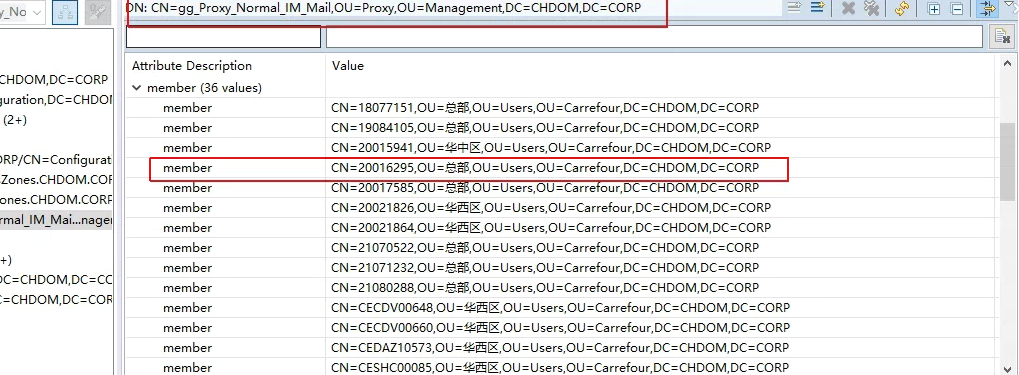
- Check the security group settings of the domain user on the domain and confirm that the user is in the corresponding domain security group:
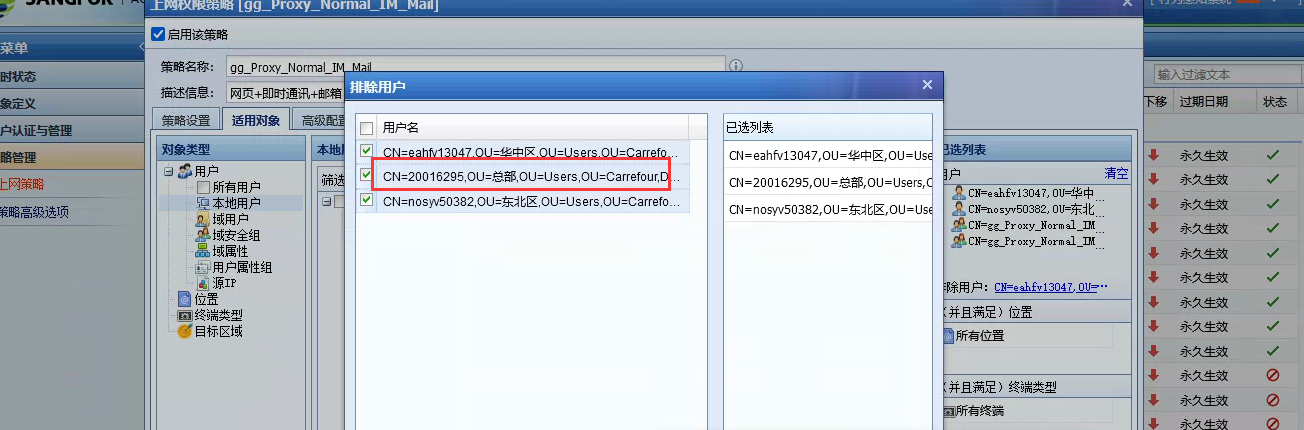
- Carefully check the Internet access policy configuration and find that there are several excluded users. Click on the excluded user list and find that the domain users who are not associated with the policy have been manually excluded.
Root cause
The user is excluded from the Internet access policy, resulting in the inability to associate the policy.
solution
Unexclude users who were mistakenly excluded from the Internet access policy.
Suggestions and Conclusion
The information that can be displayed for users who are excluded from the Internet access policy is relatively small. It is recommended that you click in and check carefully to see if there are any incorrect exclusions.
Original Link
https://support.sangfor.com.cn/cases/list?product_id=22&type=1&category_id=7988&isOpen=true