
[IAG] Error message during installation of external data center
Problem Description
The external data center needs to be upgraded, but the following error will appear regardless of whether it is upgraded or reinstalled
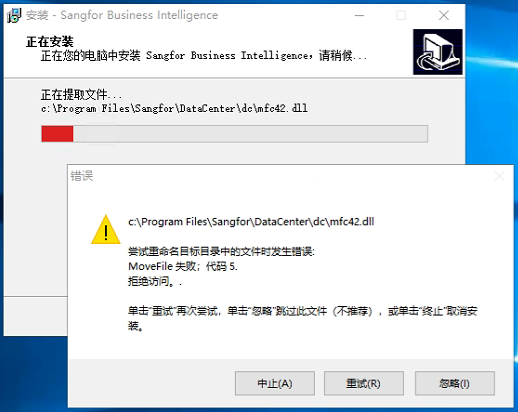
40856124cd31b418e.png (93.69 KB)
Process——
-
No external data center related processes are running in the task manager
-
Uninstall the external data center, reinstall the external data center and still get an error
-
Data center with SSL VPN installed on the server (IAG and external data centers of other product lines cannot be installed on the same server, there will be conflicts
), after uninstalling the ssl vpn data center and reinstalling the IAG data center, an error will still be reported -
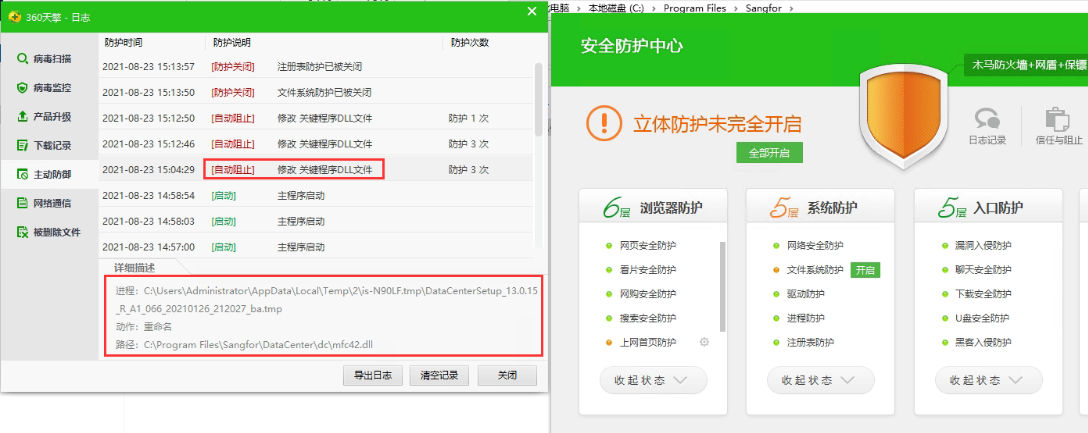
I saw that 360 TianQing software was installed on the server and the "File System Protection" function was turned on. Check the corresponding logs and find that the file renaming operation during the installation of the external data center is automatically blocked, causing the installation of the external data center to fail.
521436124d060e956f.png (222.01 KB)
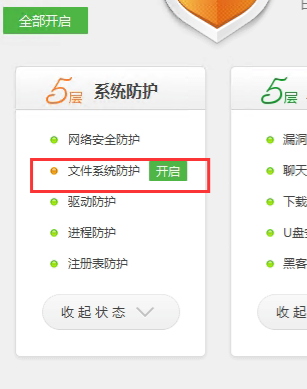
After turning off "File System Protection", IAG's external data center was successfully installed
187156124d31793d3b.png (51.05 KB)
Root cause
The "File System Protection" enabled by 360 TianQing prevented the renaming of files during the installation of the external data center, causing the installation of the external data center to fail.
solution
Disable 360 TianQing's "File System Protection"
Suggestions and Conclusion
If the installation of an external data center fails, you can end the process and reinstall it, check whether there are data centers for other product lines, and turn off the firewall or antivirus software before reinstalling and testing.
Original Link
https://support.sangfor.com.cn/cases/list?product_id=22&type=1&category_id=7694&isOpen=true