
[IAG] Error when importing lower version configuration into higher version: Configuration conversion failed
Problem Description
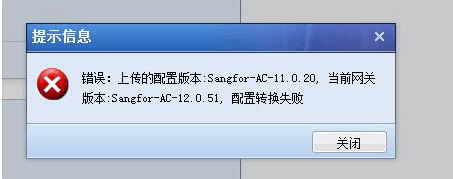
Importing IAG low version configuration to a higher version reports an error: Configuration conversion failed
375335cc274a0bb567.png (39.01 KB)
Process——
- Confirm that the configured software version (configuration version is 11.0R2 in the screenshot) can be imported into a higher version device (device software version is 12.0.5 in the screenshot)
- I found that the IE browser reported an error, but it worked fine when I switched to Google Chrome.
Root cause
Browser Issues
solution
Solve by changing to a browser other than IE
Suggestions and Conclusion
Solve by changing to a non-IE browser and re-operating
Restoring the backup (without restoring the network configuration) of IAG/SG will not restart the device, but restoring the backup (including restoring the network configuration) will restart the device.
Original Link
https://support.sangfor.com.cn/cases/list?product_id=22&type=1&category_id=6923&isOpen=true