
[IAG] Error when upgrading from IAG12.0.40 to IAG13.0.7
Problem Description
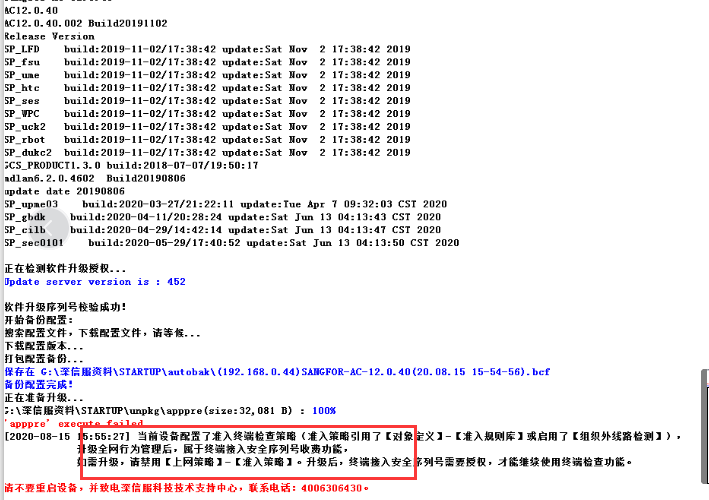
Customers reported an error when upgrading IAG devices from IAG12.0.40 to IAG13.0.7: The current device is configured with an access terminal inspection policy (the access policy references [Object Definition] – [Access Rule Base] or enables [Out-of-Organization Line Detection]). After upgrading to full network behavior management, it belongs to the terminal access security serial number charging function. If you need to upgrade, please disable [Internet Policy] – [Access Policy]. After the upgrade, the terminal access security serial number needs to be authorized before the terminal inspection function can continue to be used.
Warning Information
922705f395e0266c0a.png (87.44 KB)
Process——
If the customer does not need this function, you can disable or delete the relevant access policy in [Internet Policy] – [Access Policy] and upgrade it. If you need to continue to use this function, you do not need to upgrade to 13.0.7 or you can open the terminal access security serial number after the upgrade to enable the policy.
Root cause
Because the whole network behavior management has newly added the terminal access security serial number, the lower version does not have the terminal access security serial number and the access policy references [Object Definition] – [Access Rule Base] or enables [Out-of-Organization Line Detection], so it is not allowed to upgrade to version 13.0.7.
solution
If the customer needs this access function and does not want to obtain the terminal access security serial number after the upgrade, just terminate the upgrade.
[Note] For other errors, please do not terminate the upgrade at will. This article only explains this error. You can terminate the upgrade
Original Link
https://support.sangfor.com.cn/cases/list?product_id=22&type=1&category_id=7562&isOpen=true