
[IAG] External data center upgrade failed – SQL Server Reporting Services (MSSQLSERVER) occupied port 80
Problem Description
External 6.1 upgrade 11.X error
Process——
- Upgrade error configuration conversion failed, web port is not port 80, change to port 80 error, port is occupied
- Check the usage of server port 80
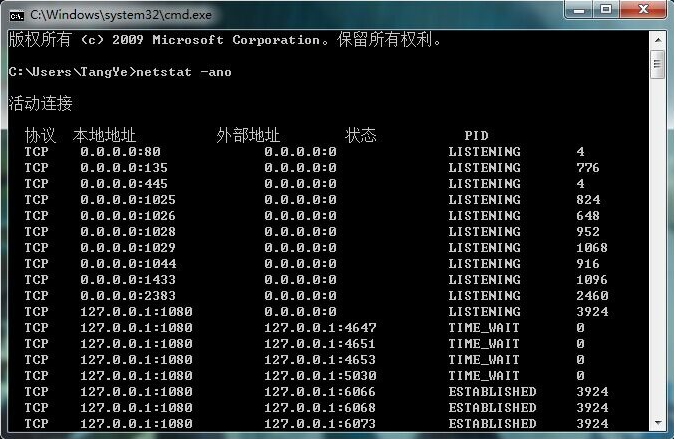
959245d58d7a8d0efb.png (174.27 KB) - Check what process is occupying
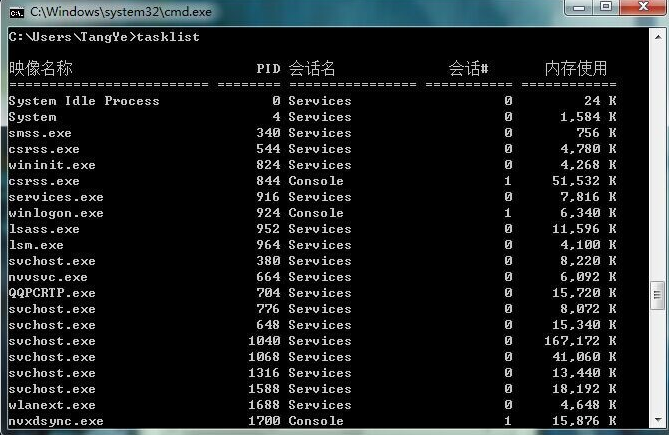
323605d58d7bf99137.png (176.87 KB) - The system occupies port 80. After querying, it is found that the component in SQL Server 2008, SQL Server Reporting Services (MSSQLSERVER), occupies port 80. It is the logging system of SQL Server
- Enter services.msc in the Run box to enter the service window. Or you can directly enter "Services" in the search box in the Start menu to open it. Then find the SQL Server Reporting Services (MSSQLSERVER) service and stop it. The occupied port 80 will be released.
Root cause
When upgrading from external 6.1 to 11.X, the web port needs to be changed to port 80, but port 80 is occupied
solution
Change the web port to port 80
Original Link
https://support.sangfor.com.cn/cases/list?product_id=22&type=1&category_id=7101&isOpen=true