
[IAG] External data center upgrade fails with “Port 443 is occupied by another program”
Problem Description
External DC6.1 failed to upgrade to DC11.0R2, prompting that port 443 is occupied by other programs
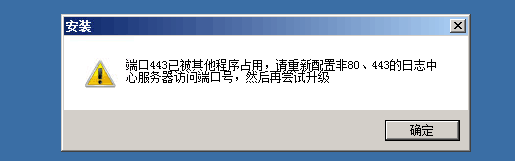
491235b5318a7c838c.png (9.42 KB)
Process——
1: First, use the command to check which service 443 is occupied.
netstat -ano | findstr 443

888625b5319b0da01c.png (4.81 KB)
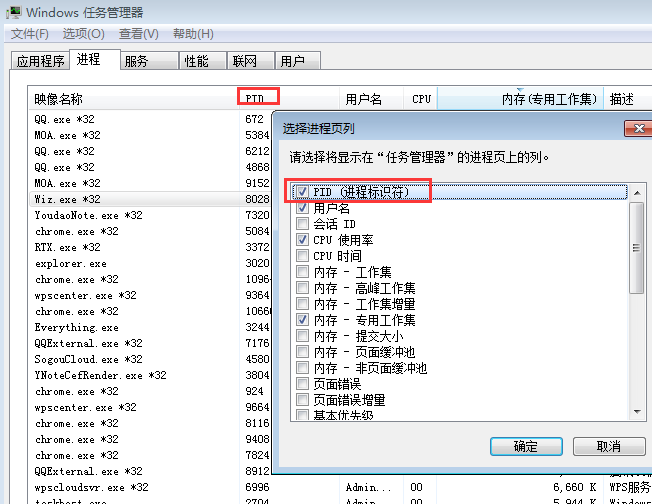
2: Go to Task Manager -> Processes, then in View > Select Columns, check PID, and then find the process 2368 according to the PID
158095b531a9b3f7f6.png (47.72 KB)
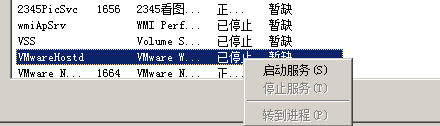
3: According to the process > right click to go to the service, stop the service to solve
197765b531b2e8c81b.png (6.61 KB)
Root cause
The external data center has VMware virtual machines installed, which occupy port 443. The default port of our DC11.0R2 web interface is also 443, which causes the upgrade to fail when the port is detected to be occupied.
solution
Stop the VMware service or uninstall the VMware virtual machine to solve the problem
Original Link
https://support.sangfor.com.cn/cases/list?product_id=22&type=1&category_id=6046&isOpen=true