
[AF] Abnormal packet loss in SSL VPN caused by not Restart AF device after authorization
Problem Description
SSL VPN access is normal, but there will be periodic packet loss. When the packet loss occurs, the VPN is running normally.
Effective troubleshooting steps
-
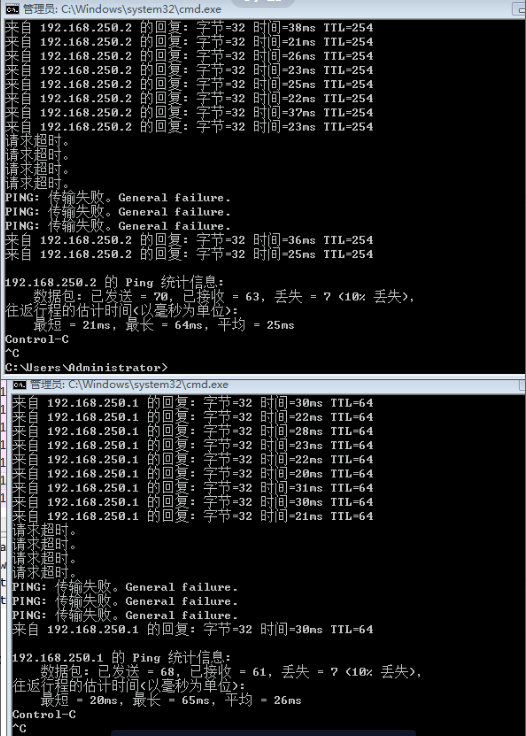
The public network side conducts ping tests on both the local device and the customer device, and finds that packet loss occurs at the same time, thus eliminating the impact of the customer terminal environment;
-
Local packets at the firewall's external network port, TUN port, and internal network port at the same time (all TUN ports are used to capture packets at the same time). When packets are lost, the packet capture command of the TUN port that was previously able to receive data normally stops automatically, and occasionally the ping command displays abnormal Info:
-
Compare the data packets and find that Sensitive no unresponsive requst request in the data packets;
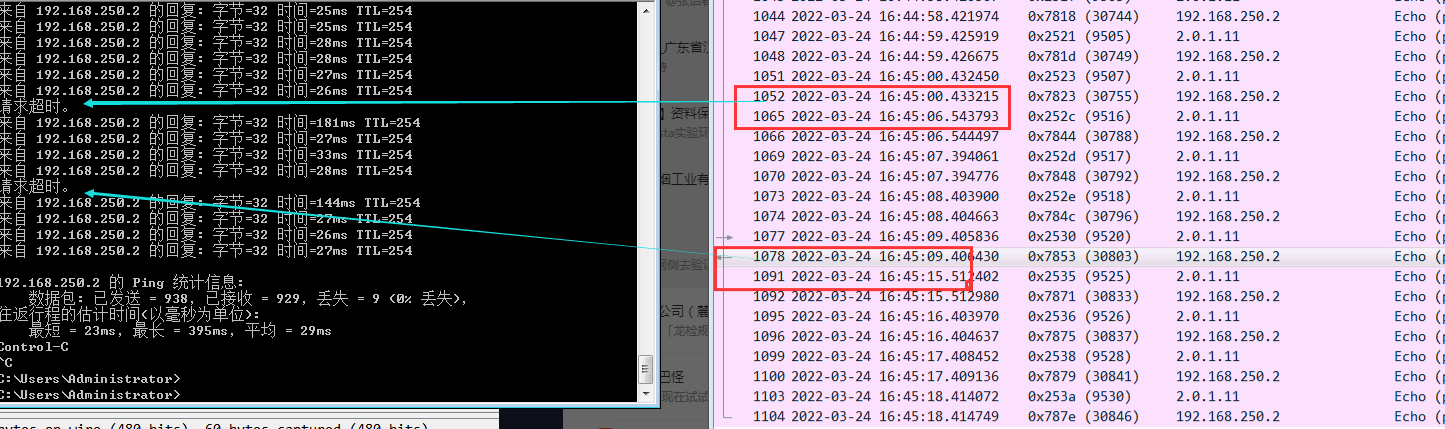
(The frequency of data packets received by the TUN port at the time of packet loss is abnormal. Under normal circumstances, one packet is received every 1s. When packet loss occurs, no data packets are received in the Medium of 6s. Therefore, it is suspected that the problem lies in the encapsulation process from the WAN port to the TUN portMedium) -
Confirm with R&D that the problem is caused by not restarting after authorization, and the problem needs to be solved by Restart the device later;
Root cause
The TUN port related processes will automatically Restart in about 10 minutes if the device is not Restart without authorization, which will cause abnormal TUN port forwarding and packet loss.
solution
Restart after restarting the device;
Suggestions and Conclusion
When troubleshooting a problem that is strange, you can pay more attention to whether the device has not been restarted after authorization;
Original Link
https://support.sangfor.com.cn/cases/list?product_id=13&type=1&category_id=1531&isOpen=true