
[AF] AF Interfaces Zones based on VLAN Connection Control area Policies does not take effect
Problem Description
On AF, we configured the Connection Control Policies for the intranet PC 192.168.1.2, but found that it did not take effect.
Process——
- The Connection Control Policies limits the number of connections of the test PC to 1, but the test PC can still access the Internet normally;
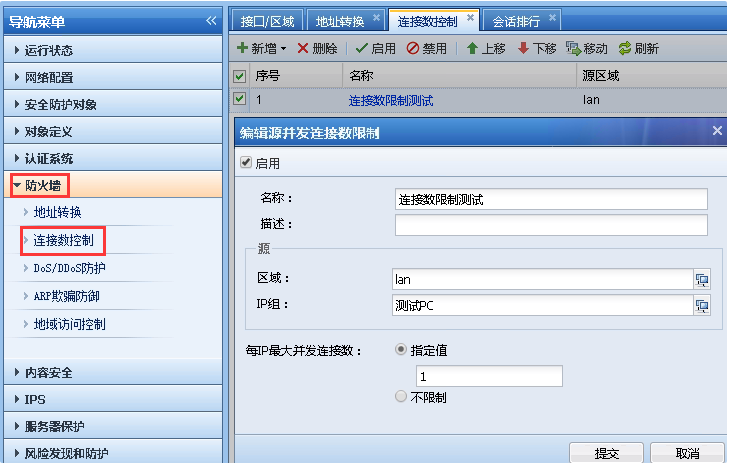
1.png (41.58 KB)
- Execute the command netstat -ano in the CMD of the test PC 192.168.1.2 and find that many Sessions connections are established;
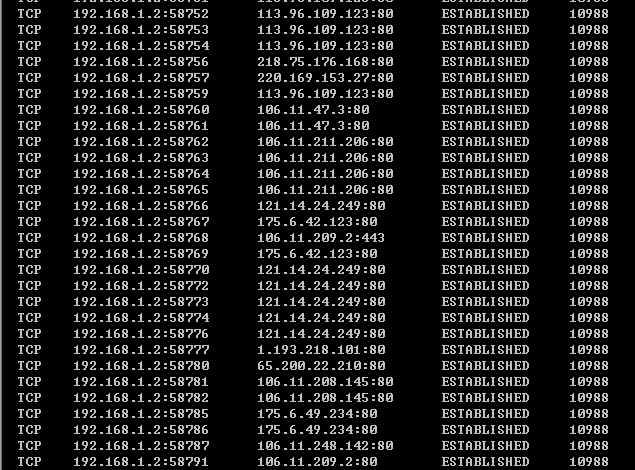
140895b6ebf29a283f.png (41.75 KB)
-
Check that AF has not enabled global exclusion or pass-through for the test PC 192.168.1.2;
-
Check the configuration and find that Connection Control Policies is configured for the LAN Zones. However, the LAN Zones contains the vlan1 Interfaces but not the physical Interfaces. Inform the customer that the AF Connection Control Policies is effective based on the physical interface of Zones.
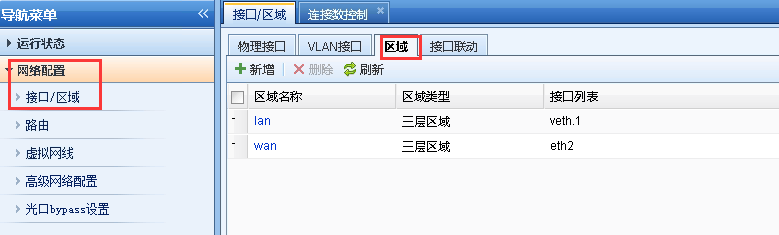
2.png (16.75 KB)
Root cause
The AF Connection Control Policies is based on the physical Interfaces.
solution
Adjust the Network configuration of AF, delete the vlan1 Interfaces, change the internal network port to a Layer 3 port and configure the default gateway address of the PC, add the internal network port to the lan Zones, and then test the Connection Control Policies to take effect;
Original Link
https://support.sangfor.com.cn/cases/list?product_id=13&type=1&category_id=281&isOpen=true