
[AF] AF is used as a DHCP server, and some terminals occasionally fail to Obtain DHCP addresses and disconnect from the network
Problem Description
- Customer AF acts as a gateway and a DHCP server for 5 Network Segment (24Netmask). There is only one DHCP server, AF, in the feedback network.
- On one of the Network Segment, individual terminals (not fixed) were disconnected from the network every day. After checking, it was found that the DHCP address Obtain was already occupied;
- The device occupying the address is obtained by DHCP;
Customer questions:
Why does AF distribute IP Address to two devices? Don’t send it when there is a second conflict;
Warning Info
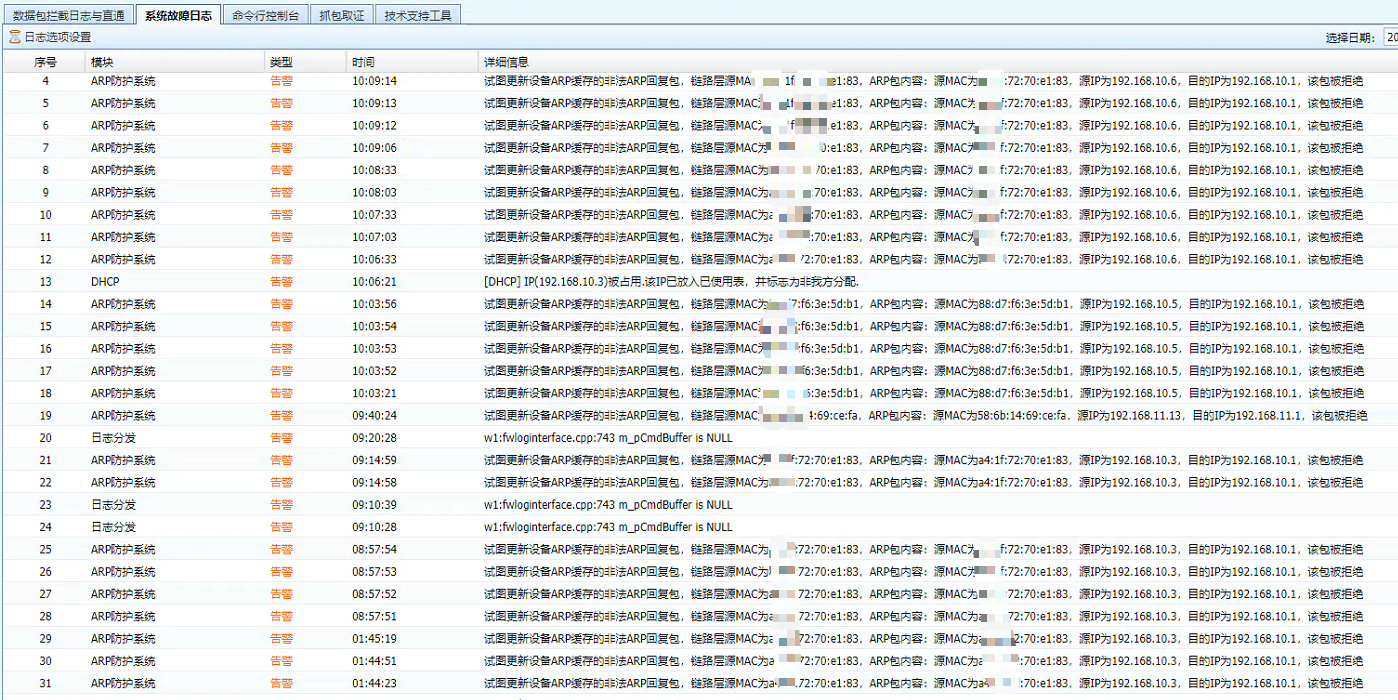
Check the system fault log on System: 1 shows that the DHCP address is not allocated by me, 2 shows that there is an ARP spoofing attack
Effective troubleshooting steps
- First, determine that the DCHP server should not distribute one address to two terminals. It is necessary to confirm how the addresses of the two devices are Obtain;
- It is necessary to find the two terminals with the problem, capture the packets to confirm whether it is statically configured or obtained by DHCP; if it is Obtain by DHCP, what is the device address of the DHCP server; (Because it is sporadic and random, the customer cannot capture the packets to confirm. At the same time, it was reported that there was only one DHCP server in the intranet);
- Check the fault log and find that the device that first gets the address triggers an ARP attack and the ARP packet is discarded by AF. At this point, it can be determined that the DHCP Services cannot know that the address is already occupied.
Root cause
The IP Address of the device in the intranet may be Preemption, but the Preemption device triggers the ARP protection function, resulting in the DHCP Services not updating the occupied IP; the original IP Address is still issued to the problematic device, resulting in a conflict and disconnection from the network;
solution
- This is an environmental problem. The most correct solution is to solve the environmental problem of address Obtain; find a way to handle address Obtain (whether it is static configuration by employees, whether there are other DHCP servers, etc.)
- You can stop the ARP defense function or make exceptions for individual devices, allowing AF to learn the MAC Address and update it to the DHCP Services;
- Change Network Segment. In this case, the problem is that a certain Network Segment is abnormal. You can move all the devices in this network segment to other Network Segment (this requires a major change in the customer environment and is generally not recommended).
Original Link
https://support.sangfor.com.cn/cases/list?product_id=13&type=1&category_id=1232&isOpen=true