
[AF] AF8.0.51 is configured with SSL VPN. After access, the resources of the Local intranet Interfaces and sangforvpn branch cannot be accessed
Problem Description
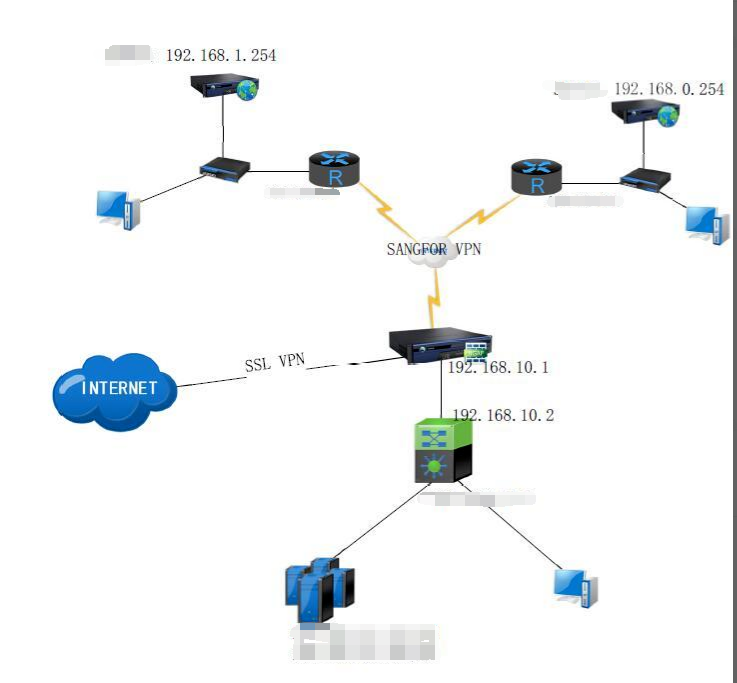
After configuring SSL VPN, the customer released intranet resources, Local intranet Interfaces, and sangforvpn branch resources, but could only access intranet resources.
After SSL access, you can access 192.168.10.2 normally, but you cannot access 192.168.10.1 of the AF Interfaces, 192.168.1.254 of the sangforvpn branch, and 192.168.0.254Network Segment
Effective troubleshooting steps
-
Check the basic configuration of SSL VPN. The Network Segment have been published normally and configured as L3 resources. Use the device source IP to access resources.
-
After starting packet capture analysis, it was found that the device did not respond when accessing the Local Interfaces. After confirming with R&D, the AF local webui can only be accessed through TCP applications. After publishing the AF Interfaces resources as TCP resources, access to the AFweb page is normal.
-
When capturing packets from the VPN Tun port, we found that the branch was accessed via a virtual IP, and there was no response from the branch. Our SSL VPN access to resources using the device source IP is only effective for the LAN Zones, and we need to manually add a Source NAT for the VPN Tun Zones to access it.

Root cause
- AF native webui can only be accessed through TCP applications
- By default, accessing resources with the device source IP is only effective for the LAN Zones. The VPN Zones needs to manually add source address translation rules.
solution
- Modify AF Interfaces resources to TCP resources for access
- Manually configure source address translation from Tunl port to vpntun port
Original Link
https://support.sangfor.com.cn/cases/list?product_id=13&type=1&category_id=1479&isOpen=true