
[AF] AF’s SSL VPN XP System cannot access resources and the browser reports an error
Problem Description
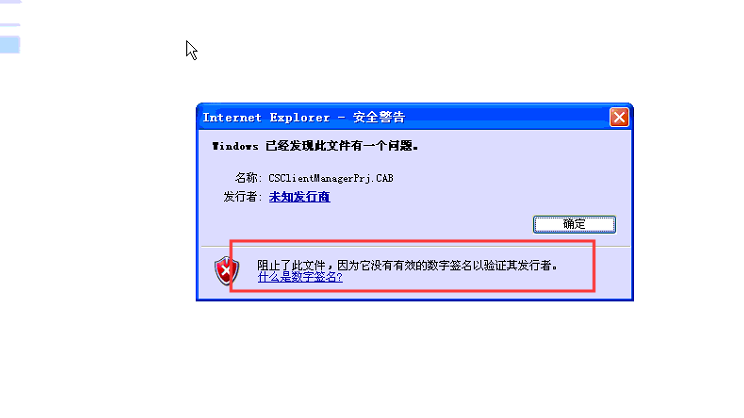
AF deployed SSL VPN and used IE browser on XP System to connect to VPN, but the control could not be installed and resources could not be accessed. The installation prompt error is as shown below.

940725dde79838d359.png (108.21 KB)
Warning Info
The CSClientManagerPrj control does not have a valid digital signature to verify its publisher.
Process——
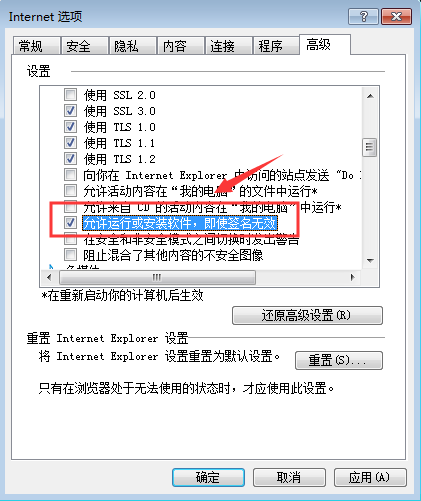
According to the warning, the CSClientManagerPrj control does not have a valid digital signature to verify its publisher. That is to say, the IE browser does not trust the digital signature of this control. After learning this Info, I checked the advanced settings of the IE browser and found that it did not allow untrusted signatures to install controls. After checking, Restart IE to test and you can access it normally.
304155dde7388865e7.png (45.77 KB)
[attach]430495[/attach]
Root cause
The root cause is the signature of the CSClientManagerPrj control. IE thinks there is a problem, so it cannot install the control.
solution
The solution is to modify the advanced options of the IE browser so that the IE browser does not intercept untrusted digital signatures and allows them to be installed normally.
924785dde78f56e9c5.png (31.63 KB)
Suggestions and Conclusion
If the SSL VPN control fails to install, you can adjust the System settings according to the error message.
Original Link
https://support.sangfor.com.cn/cases/list?product_id=13&type=1&category_id=820&isOpen=true