
[AF] After establishing VPN with third-party connection (standard IPSec), data is not accessible
Problem Description
After AF successfully established IPsec VPN with Neusoft Local, AF intranet users could not access headquarters intranet resources.
Warning Info
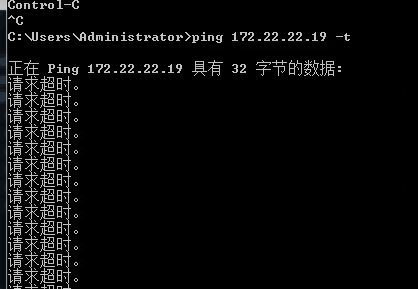
The branch intranet user cannot ping the headquarters intranet IP Address, as follows:
1.png (2.68 KB)
Process——
- Open direct connection as usual, the direct connection configuration path is as follows:
(1) Take the standard version AF7.3 as an example: You can configure it in [Maintenance] – [Packet Interception Log and Direct Passthrough]
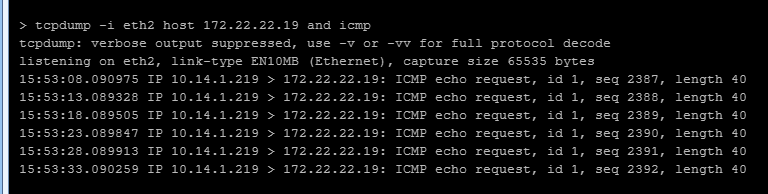
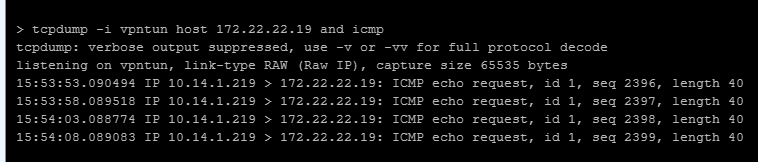
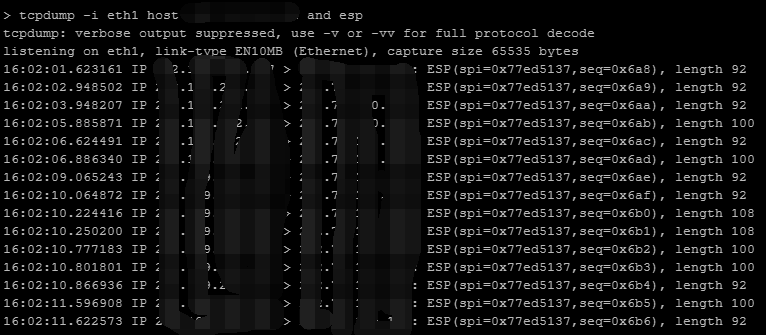
(2) Take the standard version AF7.4 as an example: You can configure it in [System] – [Troubleshooting] – [Packet Interception Log and Direct Passthrough] - Capture packets at AF's LAN port, VPN tun port, and WAN attribute respectively, and find that there are only request packets but no reply packets, as follows:
Command Line console opening path:
(1) Taking the operation path of the standard version AF7.3 as an example, you can view or execute the commands supported by the current version in [System Maintenance] – [Command Line Console].
(2) Taking the operation path of the standard version AF7.4 as an example, you can view or execute the commands supported by the current version Medium [System] – [Troubleshooting] – [Command Line Console].
vpntun and intranet port:
2.png (4.88 KB)
3.png (3.75 KB)
External network port:
343985d3d8a1285f61.png (56.97 KB) - Coordinate with the other end to capture and analyze the packet and find that it is intercepted by the other end's security device.
Root cause
The packet is intercepted by the peer security device.
solution
After the peer security device releases Policies, normal access is possible.
Suggestions and Conclusion
If the IPsec VPN is successfully established but the data is different and the direct connection still exists, it is recommended to capture packets on the device's LAN port, VPN tun port, and WAN attribute, analyze which step has the problem, and solve it according to the specific situation. If you don't know how to capture packets for analysis, please call 400-630-6430 to consult with our engineers.
Original Link
https://support.sangfor.com.cn/cases/list?product_id=13&type=1&category_id=704&isOpen=true