
[AF] After uninstalling the Linux anti-tampering client, an error message appears when executing a command
Problem Description
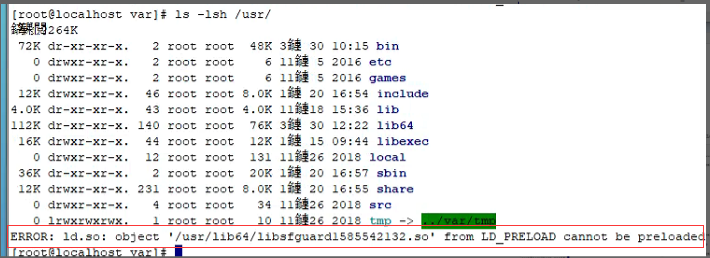
System Linux system, an error message appears when executing a command after uninstalling Tamper Protection. As shown in the figure:
Effective troubleshooting steps
- According to the error message, an anti-tampering driver under /usr/lib64 is abnormal and the driver with this name is not found.
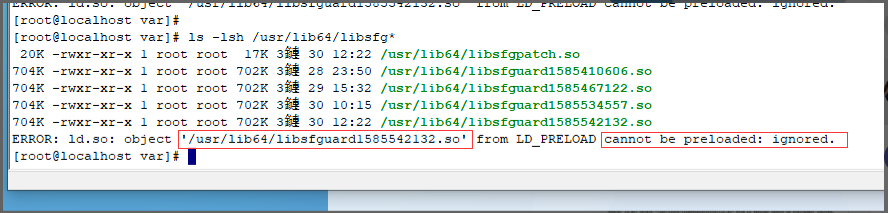
- You can see that there are so files with other names in the directory. Check the md5. If the md5 is consistent, it means that the actual files are the same.
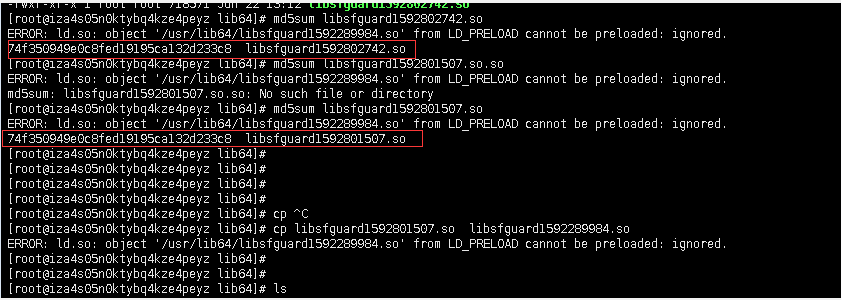
- The error message is that the xxx file cannot be loaded. Try replacing it with the old file.
cp Existing driver name Error message: Abnormal driver name
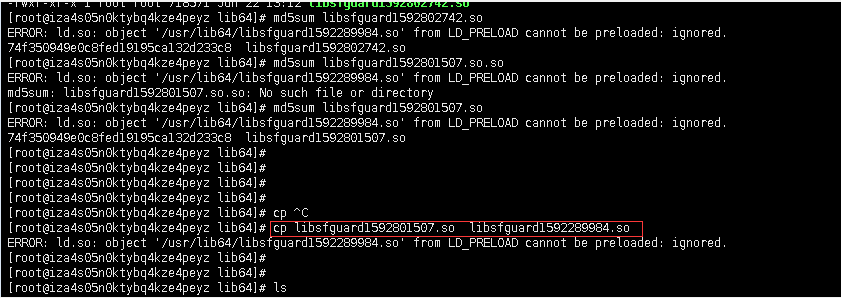
After replacing it it's back to normal.
Root cause
Each time Anti-Tampering is installed, a driver named libsfguardxxxx.so will be generated in the /usr/lib64 directory. After uninstalling Anti-Tampering, the corresponding so file will be deleted. After reinstalling, some configuration files (sfguard.conf) are not updated, and it will try to reload the previous driver. Since the previous driver has been deleted, this error will occur.
solution
Manually generate a missing so file (proven feasible)
cp Existing driver name Error message: Abnormal driver name
Original Link
https://support.sangfor.com.cn/cases/list?product_id=13&type=1&category_id=925&isOpen=true