
[AF] After upgrading to AF8.0.2, VPN connection failed. System fault System reported OUT IP invalid. Multi-line settings were enabled but multi-line was not configured.
Problem Description
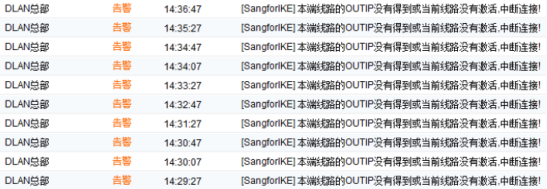
After upgrading to AF8.0.2, VPN connection failed and the system fault System an error OUT. The IP is invalid.
Warning Info
368635bd526aef1906.png (100.77 KB)
Process——
- Check the VPN Interfaces external network interface. The IP used for VPN interconnection is placed in the first line alone, and the remaining IPs are placed in another line. Determine the cause of the problem: the IP used for VPN interconnection is not placed in the first line.
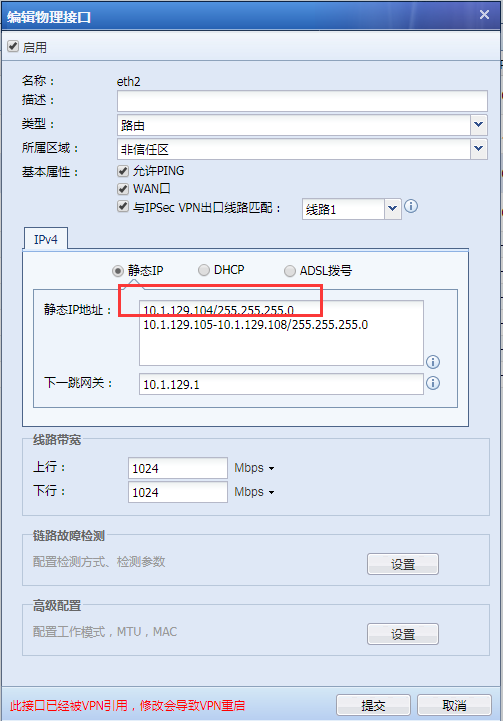
834595bd527a171703.png (36.5 KB) - Check [Network] – [IPSec VPN] – [Multi-line Settings] Medium see that [Gateway Mode] is enabled for multiple lines but no line is configured:

488885bd52ad5958cf.png (4.8 KB)
Root cause
In versions prior to AF7.5.1, you can check [Gateway Mode] to enable multiple lines without configuring lines. However, in versions later than AF8.0.2, if you check [Gateway Mode] to enable multiple lines, you must configure lines. Otherwise, the VPN will fail to connect, and the error log is shown in Info alarm information.
solution
Solution 1: When there is only a single external network line, just uncheck "Enable multiple lines under Network ModeMedium in [Network] – [IPSec VPN] – [Multi-Line Settings].
Solution 2: When there are multiple external network lines: In [Network] – [IPSec VPN] – [Multi-line Settings]Medium check [Gateway Mode] to enable multiple lines and configure one line.
Original Link
https://support.sangfor.com.cn/cases/list?product_id=13&type=1&category_id=450&isOpen=true