
[AF] Anti-Tamper 2.0 Windows client protection does not work, explorer.exe has been added to the Whitelist
Problem Description
The Anti-Tamper 2.0 client is enabled on the client server, but new txt files can still be created and deleted in the protection directory.
Process——
- Check Policies] – [Security Protection Policies] Medium see that the website anti-tampering module has been enabled, as shown in the following figure:
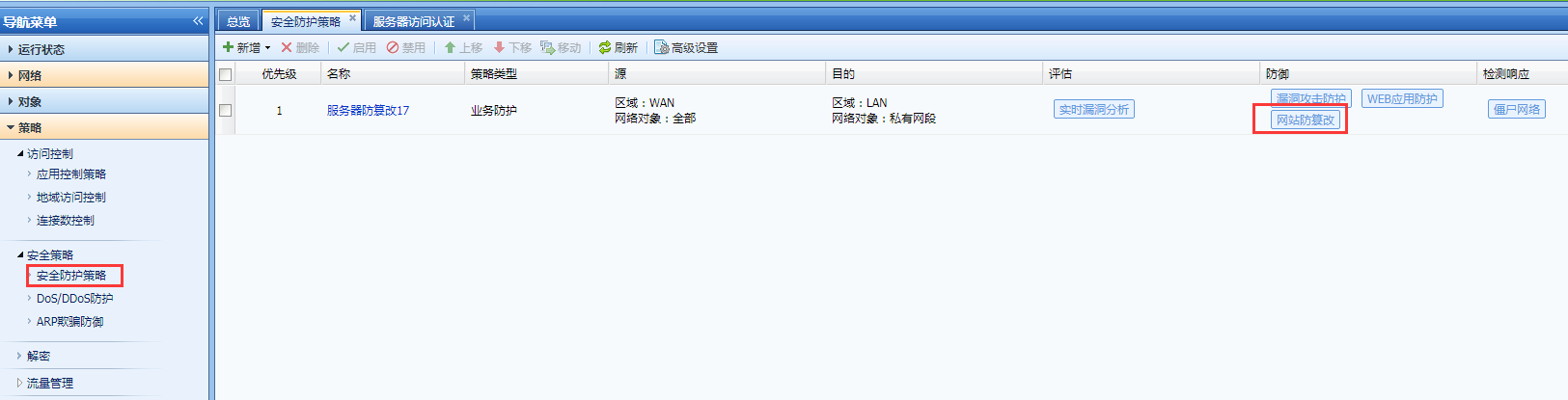
647155e7a009c0e13d.png (53.35 KB) - Log in to the corresponding server and open the anti-tampering client to check and find that explorer.exe is added to the trust list, as shown in the following figure:
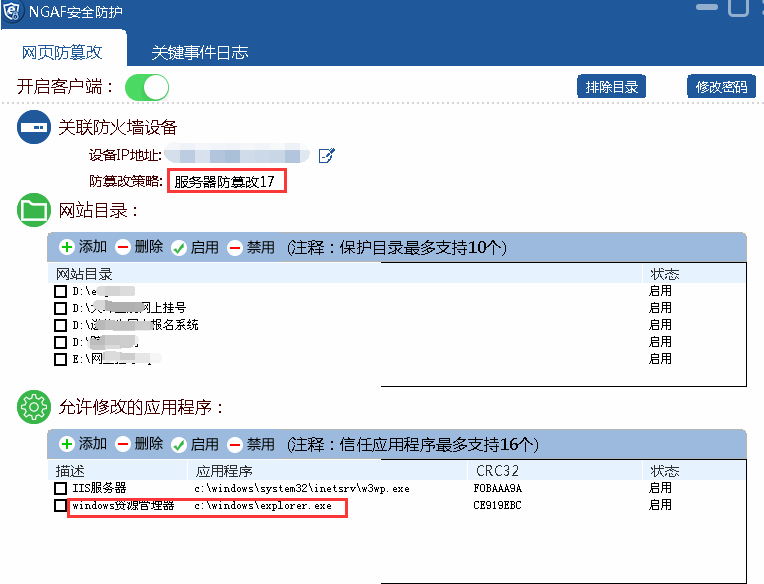
110795e7a010a3bf97.png (38.85 KB)
Root cause
explorer.exe is the Windows program manager or file explorer, which provides users with a graphical user interface. Simply put, it is used to display System desktop environment, including desktop icons and file management. Adding explorer.exe to the Tamper Protection client trust list will render Tamper Protection 2.0 client protection ineffective.
solution
Simply delete explorer.exe from the Tamper Protection client trust list.
Original Link
https://support.sangfor.com.cn/cases/list?product_id=13&type=1&category_id=831&isOpen=true