
[AF] Application control Policies does not take effect due to management IP restriction
Problem Description
The customer wants to manage AF devices through SNMP. The direct connection works normally. The customer enables the connection in the application control Policies, but the default deny policy is still matched.
Effective troubleshooting steps
1. Check the application control Policies. There is no problem, no long link, but no matching number;

1.png (272.74 KB)
1

2. Check the Application Control Logs and find that the default policy is matched and the advanced Policies Medium the Network settings is not turned on;
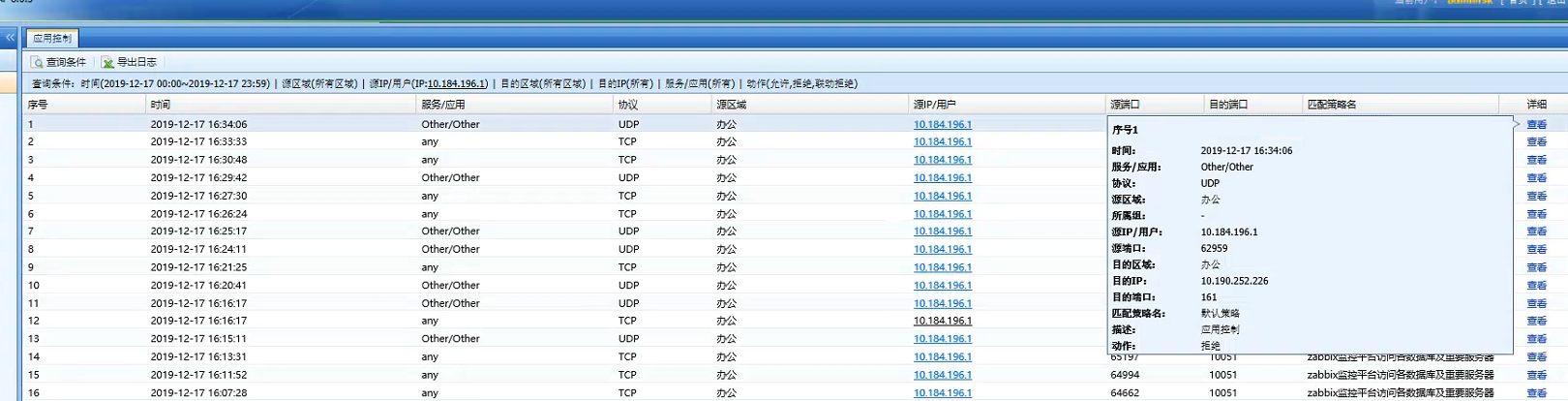
2.png (349.64 KB)
2

3. Check the area to which the corresponding address belongs and find that the IP Zones allowed to manage this device is restricted. There is no address of the snmp manager in the Objects. After adding it, it is normal and the application control Policies also has a matching number.
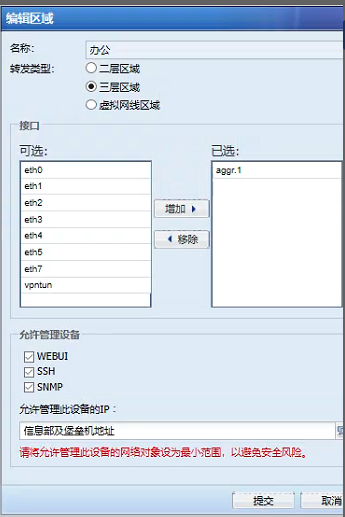
3.png (83.83 KB)
3

4.png (91.01 KB)
4
Root cause
To manage devices through the SNMP protocol, you need to enable the SNMP protocol in the corresponding Zones and add the management address of the SNMP management server to the IP address that is allowed to manage this device.
solution
Add the management address of the snmp server to the IPs allowed to manage this device.
Original Link
https://support.sangfor.com.cn/cases/list?product_id=13&type=1&category_id=853&isOpen=true